


Description
Master the Statement of Cash Flows (IAS 7) with a workbook that shows its working
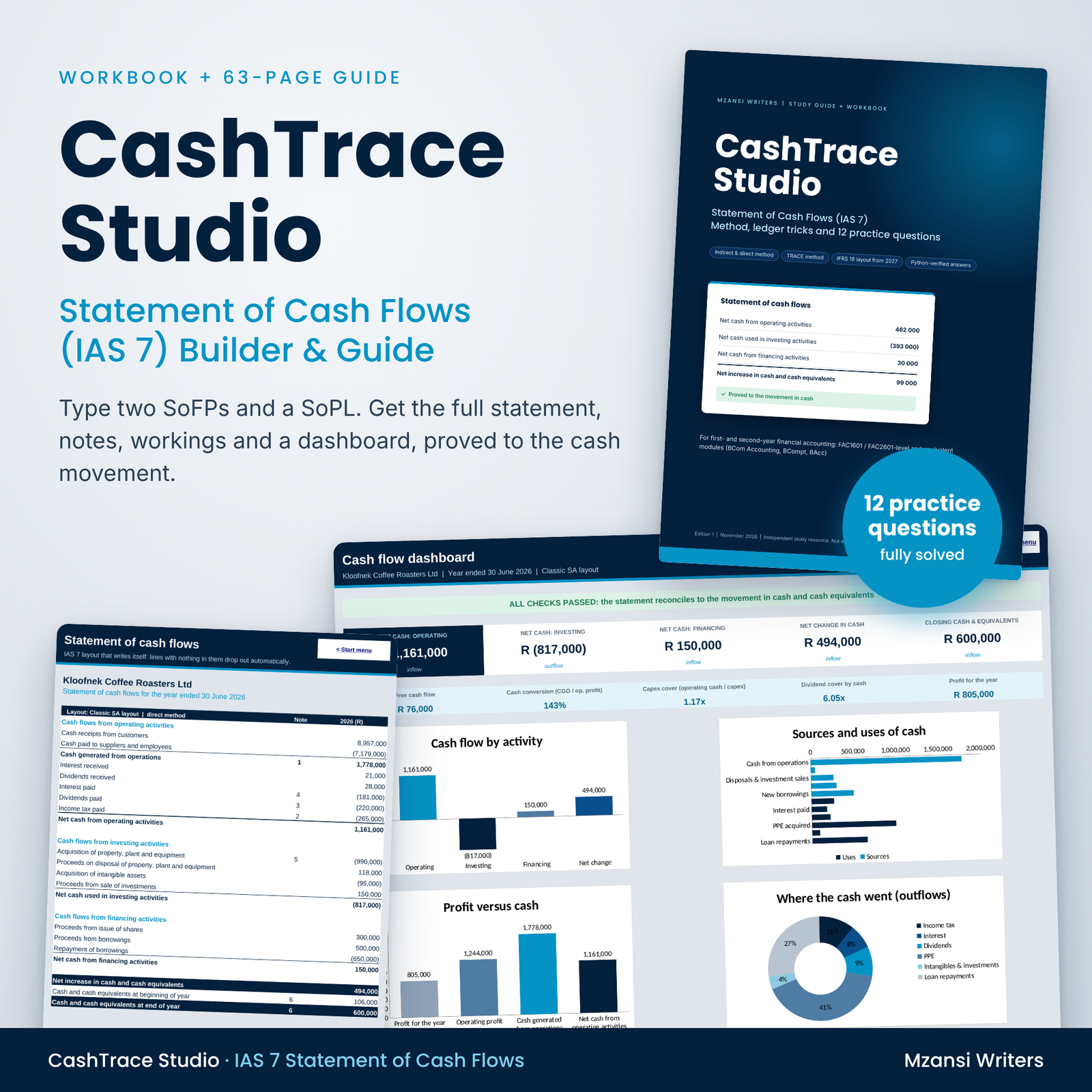
The statement of cash flows is the question that catches out more first- and second-year accounting students than almost any other. CashTrace Studio is a statement of cash flows (IAS 7) workbook and study guide that takes you from “where do I even start?” to a statement that proves to the cash balance, every time. Type in two statements of financial position and a statement of profit or loss, and the workbook rebuilds every ledger, writes the statement and the notes, and checks the answer for you. The 63-page PDF guide teaches you to do the same by hand in a test.
What CashTrace Studio does
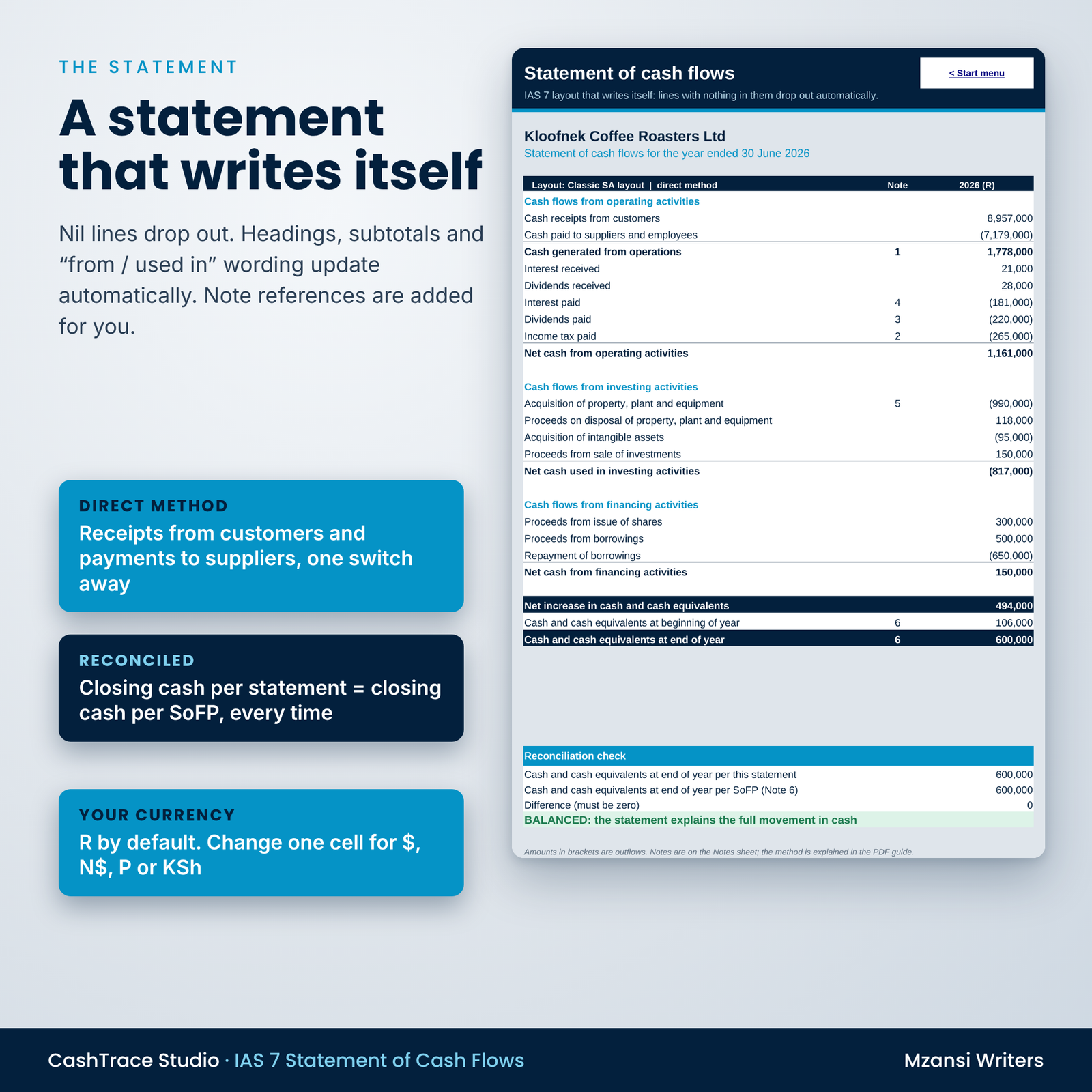
- Builds the full statement of cash flows using the indirect method, with optional direct-method lines (cash receipts from customers and cash paid to suppliers and employees).
- Writes the notes for you: cash generated from operations, income tax paid, dividends paid, interest paid, the PPE carrying amount reconciliation, cash and cash equivalents, non-cash transactions and the classification policy.
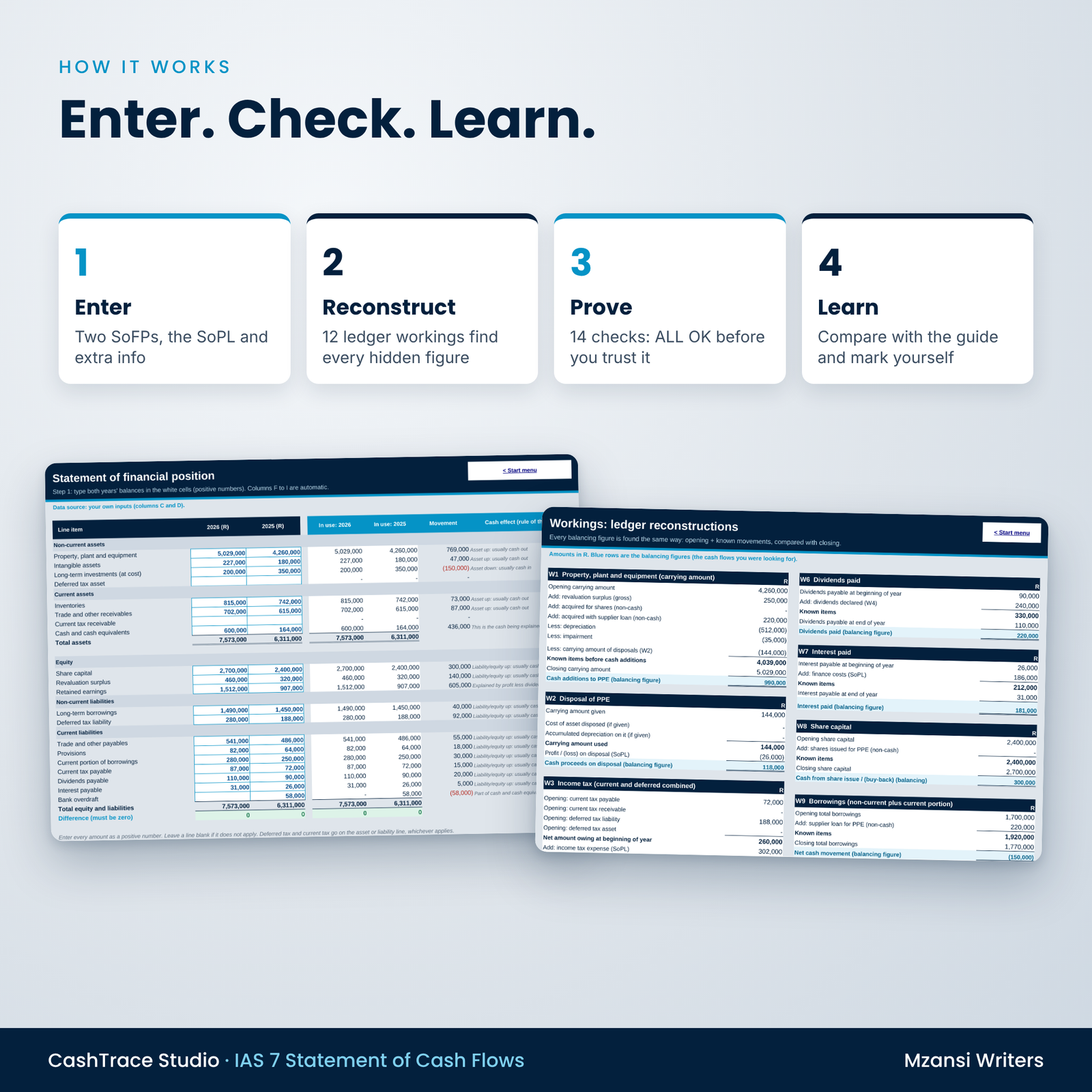
- Shows every ledger reconstruction (PPE, disposals, one-bucket tax, retained earnings, dividends, interest, share capital, borrowings, intangibles, investments and working capital), with the balancing figure highlighted.
- Proves the answer: 14 automatic checks, including the reconciliation of the statement to the movement in cash and cash equivalents.
- Explains the story on a dashboard with headline tiles, ratios, four charts and automatic insight sentences.
Who it is for
BCom Accounting, BCompt and BAcc students in their first or second year who need to prepare a statement of cash flows for a company. It is written for FAC1601- and FAC2601-level content and the equivalent modules at other South African universities, and it is useful for anyone revising IAS 7 before a test or exam.
Main benefits
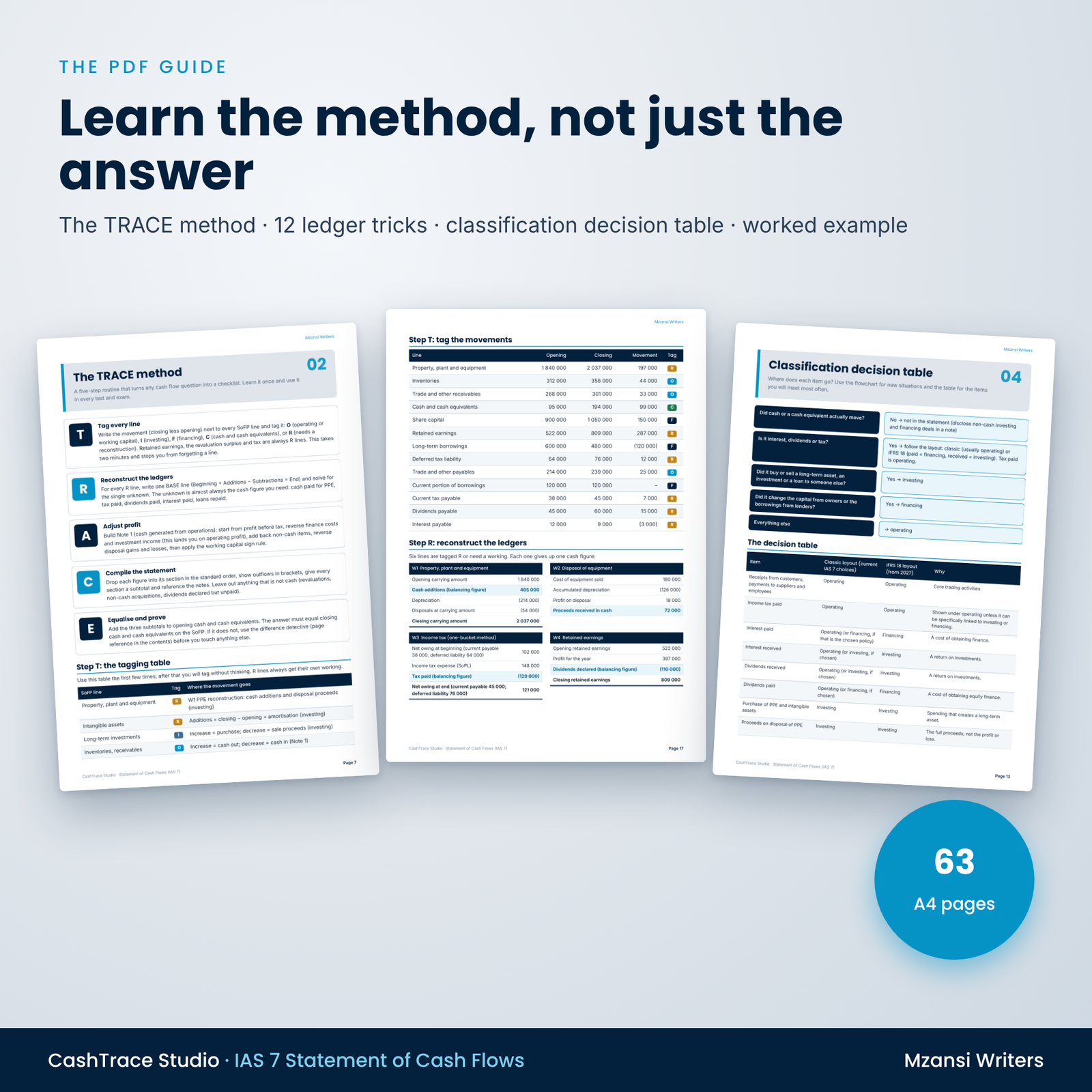
- Learn a method, not just an answer. The original TRACE method (Tag, Reconstruct, Adjust, Compile, Equalise) turns any cash flow question into a checklist.
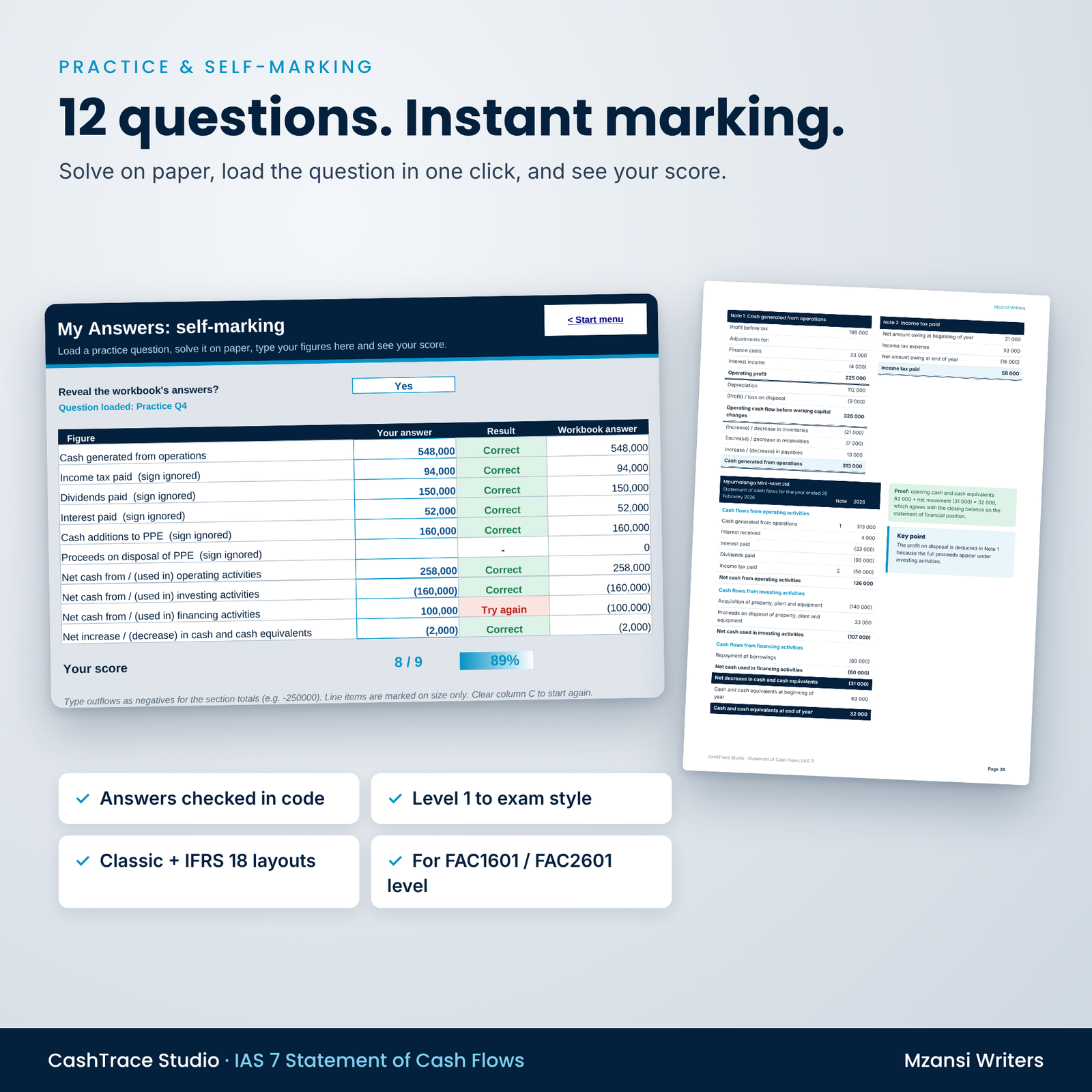
- Check your own work instantly. Load any of the 12 practice questions, type your answers on the My Answers sheet and get a score.
- Stop losing marks on classification. A decision flowchart, a 22-row decision table and a 16-item drill show where every item goes.
- Get ready for 2027. One switch shows the same data in the IFRS 18-amended IAS 7 layout (operating profit starting point; interest and dividends paid as financing; interest and dividends received as investing).
- Trust the answers. Every worked example and solution was generated from real transactions and solved a second time in code, and the workbook reproduces every one of them.
What is included
- CashTrace-Studio-Cash-Flow-Builder.xlsx: 11 sheets (Start, Dashboard, Settings, SoFP, SoPL & Info, Workings, Cash Flow, Notes, Checks, My Answers, Practice Bank). The buyer copy is blank and ready for your data.
- CashTrace-Studio-Cash-Flows-IAS7-Guide.pdf: 63 A4 pages with a clickable contents page and bookmarks. Plain-language IAS 7, the TRACE method, 12 ledger-reconstruction tricks, the difference detective for finding errors, the classification decision table, a fully worked example, 12 practice questions (Level 1 to exam style) with full solutions, and exam technique.
- CashTrace-Studio-User-Guide.docx: set-up, every feature, customising, troubleshooting and FAQ.
How it works
- Settings: choose your currency (R by default), company name, year labels, layout and data source.
- Enter: type both years’ SoFP balances, the SoPL and the additional information from the question.
- Check: the Checks sheet must show ALL OK. If not, it tells you what to look at.
- Learn: read the statement, notes and workings, and compare them with the guide.
Prefer to start with an example? Set the data source to the worked example or any practice question and every sheet fills in instantly.
Real situations where students use it
- Checking a tutorial or textbook question the night before a test.
- Finding out why a handwritten statement does not balance (the workings show exactly which figure differs).
- Practising timed questions with the suggested marks and minutes, then self-marking.
- Seeing how the IFRS 18 layout changes the three subtotals but never the net movement in cash.
File formats and software requirements
- Excel-format .xlsx; tested in LibreOffice Calc; built with standard functions for Microsoft Excel and Google Sheets. No macros and no add-ins.
- PDF guide: A4, fonts embedded, prints cleanly; opens in any PDF reader on a phone, tablet or computer.
- User guide: .docx for Microsoft Word, LibreOffice Writer or Google Docs.
Customisation
Change the currency symbol in one cell and every heading and dashboard tile follows. Set your own company name, year-end and year labels, choose the classic, IFRS 18 or a custom classification for interest and dividends, and switch the direct-method lines on or off. Formula cells are locked without a password to prevent accidents, and input cells are clearly marked with data validation.
Digital download
This is a digital product. You receive three files to download immediately after payment. Nothing is posted.
Frequently asked questions
Does this cover FAC1601 and FAC2601 cash flow statements?
It covers the statement of cash flows for companies at first- and second-year level, including disposals, revaluations, deferred tax, dividends, loans, non-cash transactions and bank overdrafts. Always check your own module’s prescribed layout.
Indirect or direct method?
Both. Note 1 uses the indirect method; the direct-method lines can be shown on the statement, and the guide has a full direct-method question.
Does it work in Google Sheets or on a Mac?
It is an .xlsx built only with standard functions supported by Excel (Windows and Mac) and Google Sheets, and it was tested in LibreOffice Calc.
What is the IFRS 18 layout?
From annual periods beginning on or after 1 January 2027, IFRS 18 amends IAS 7: the indirect method starts from operating profit, and most companies show interest and dividends paid as financing and interest and dividends received as investing. The workbook shows both layouts.
Can I enter questions from my own textbook?
Yes. Choose “My own data” and type the figures. The product does not include any university or textbook material.
Are the solutions reliable?
Every figure was produced by code from balanced statements, solved a second time independently, and reproduced by the workbook.
Can I share it with my study group?
No. The licence is for the purchaser’s personal study use only.
Licence and disclaimer
Personal study use only. No resale, sharing, uploading or redistribution. Independent study resource by Mzansi Writers. Not affiliated with, endorsed by or produced by UNISA or any other university, SAICA, SARS or the IFRS Foundation. Module codes are used only to show which syllabus this resource supports. All companies and figures are fictional.



Reviews
There are no reviews yet.