
Description
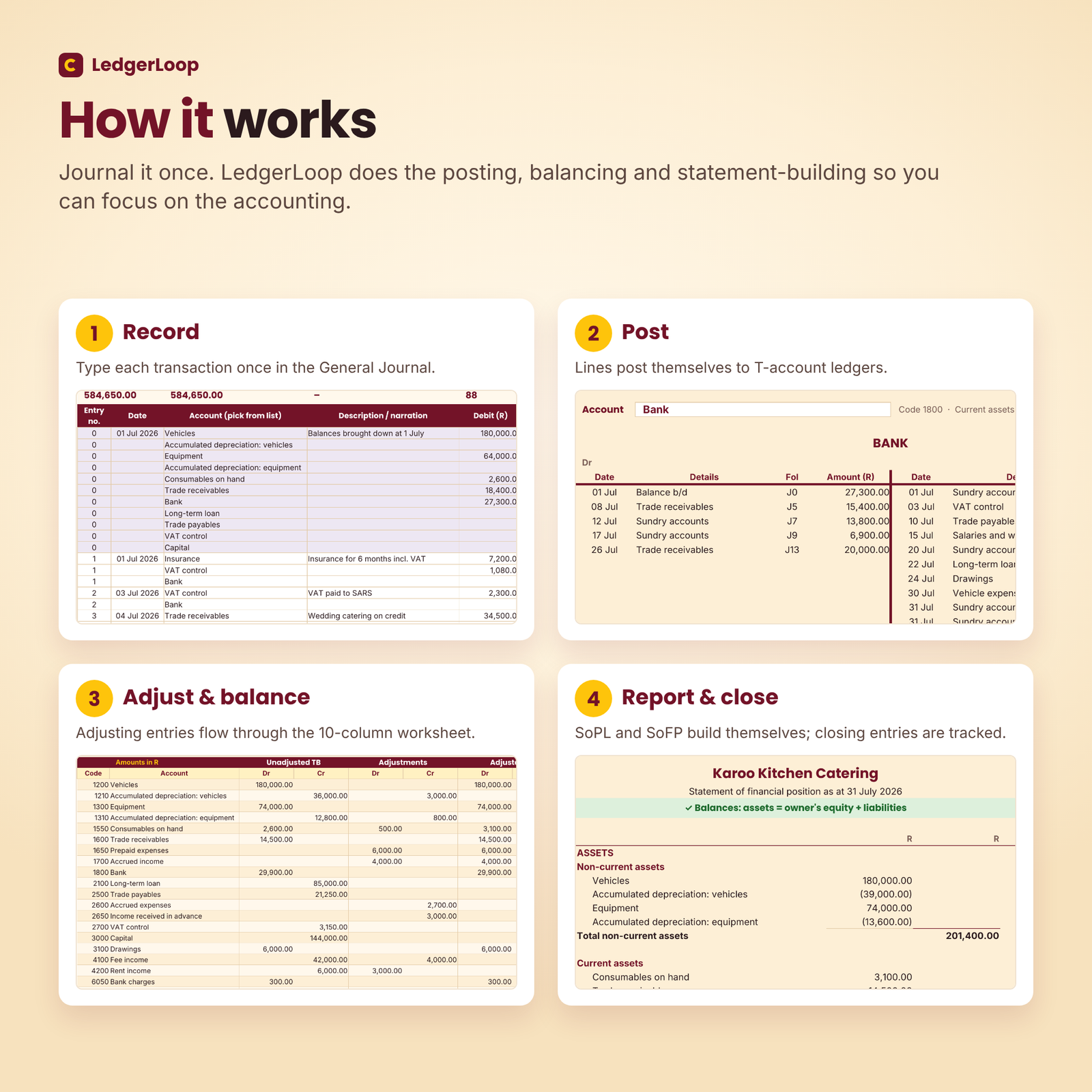
LedgerLoop is an accounting cycle practice workbook for first-year BCom Accounting, BCompt and BAcc students. You record each transaction once in a general journal, and the Excel-format workbook does the rest: it posts every line to T-account ledgers, builds the unadjusted, adjusted and post-closing trial balances, completes the 10-column worksheet, prepares the statement of profit or loss and the statement of financial position, and tracks your closing entries. Live checks tell you at every step whether your work balances.
What the accounting cycle practice workbook does
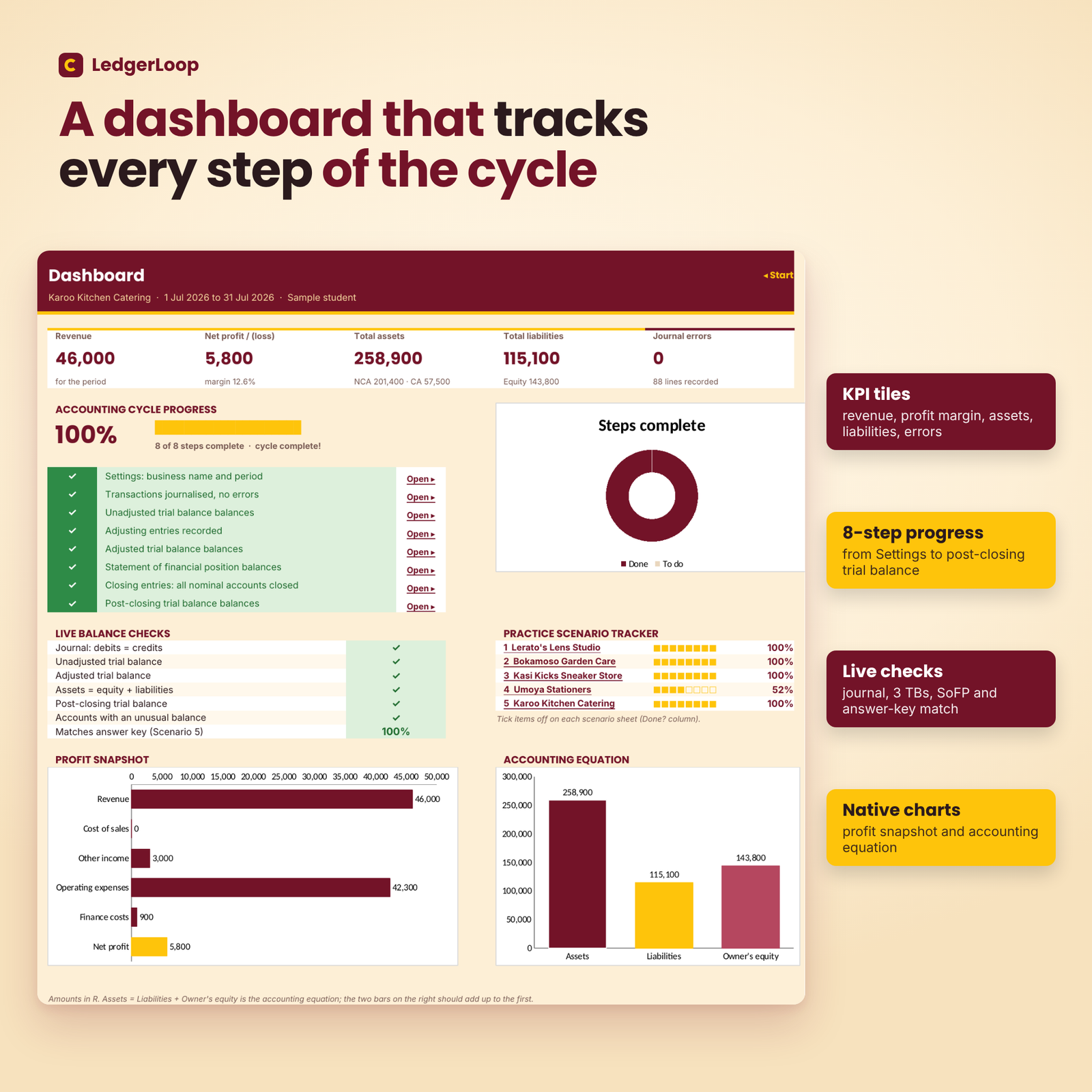
Most first-year questions follow the same eight steps: journalise, post, prepare a trial balance, adjust, prepare an adjusted trial balance, draw up the statements, close the books and prepare a post-closing trial balance. LedgerLoop follows exactly that order. A Dashboard ticks off each step as you complete it, and every sheet shows a green ✓ or a red ✗ so you know immediately where a mistake is hiding.
Who it is for
- First-year financial accounting students at South African universities and colleges.
- Students who understand debits and credits but lose marks on adjustments, VAT, balancing or closing entries.
- Tutors and study groups who want a fast way to check journal entries against a known answer (each person needs their own licence).
Main benefits
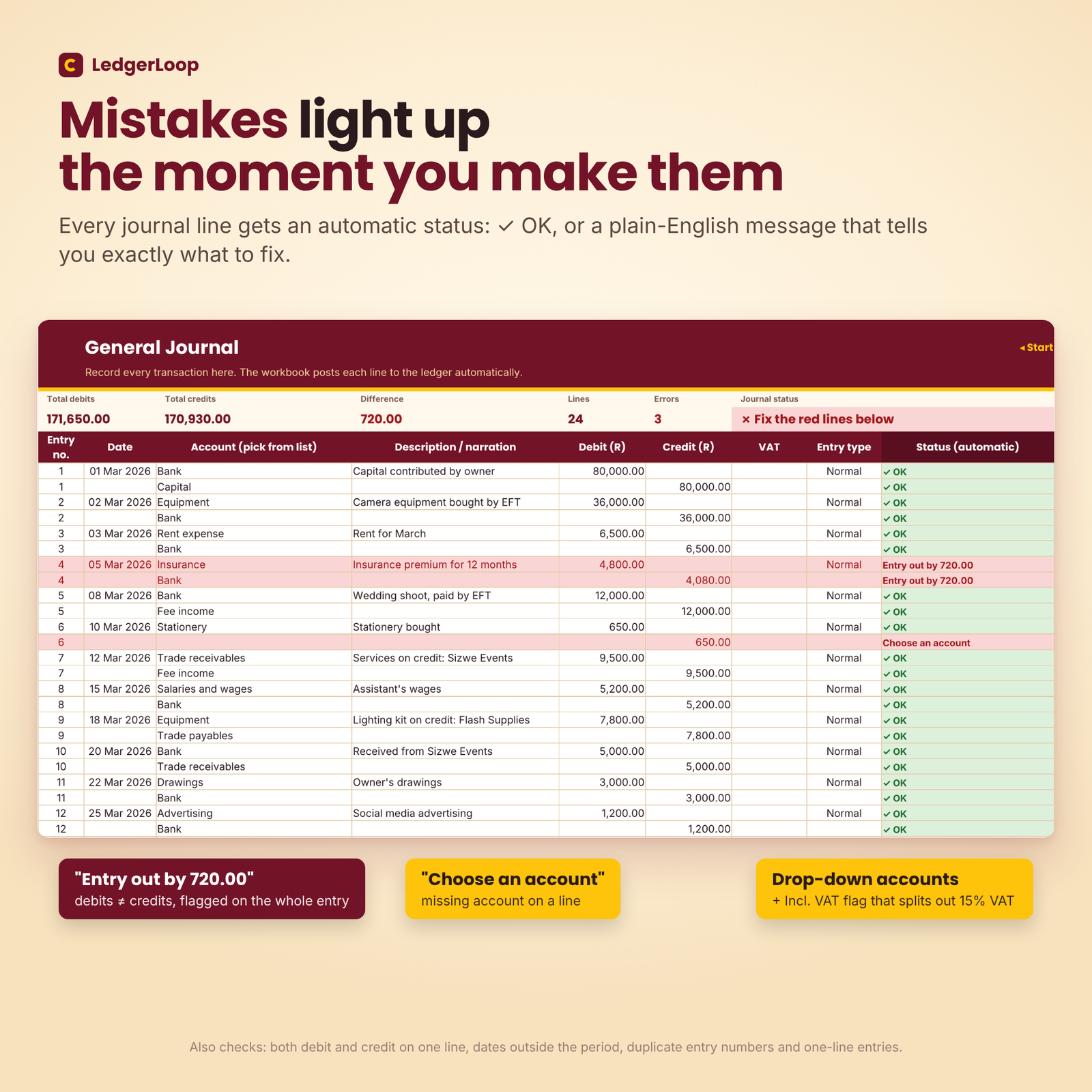
- Instant feedback: every journal line gets a plain-English status such as “Entry out by 720.00”, “Choose an account” or “Date outside the period”. Error lines turn red.
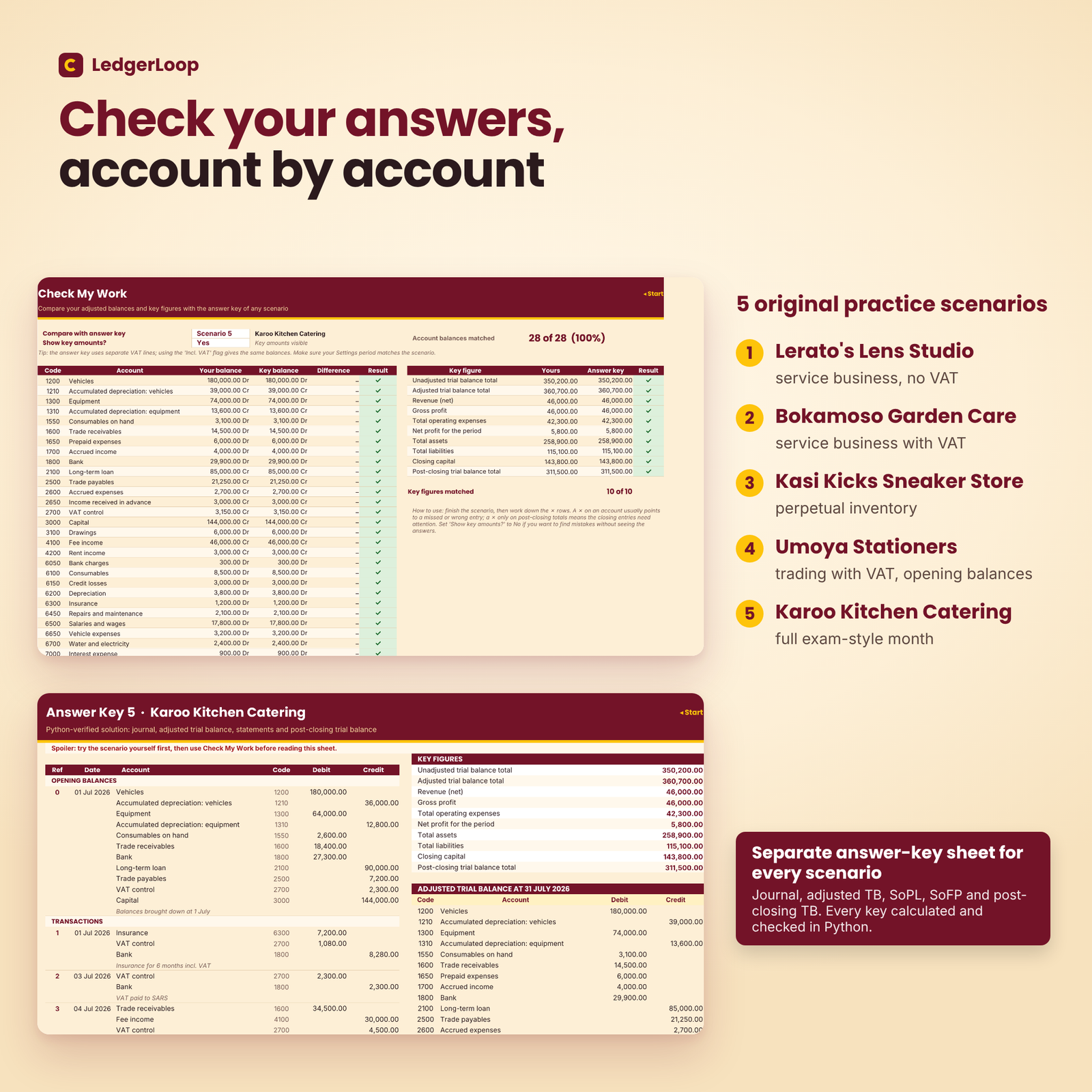
- Practice with answers: five original scenarios, each with its own answer-key sheet, and a Check My Work sheet that compares every account balance and ten key figures with the key.
- See the whole picture: T-accounts, worksheet, trial balances and statements all update the moment you type.
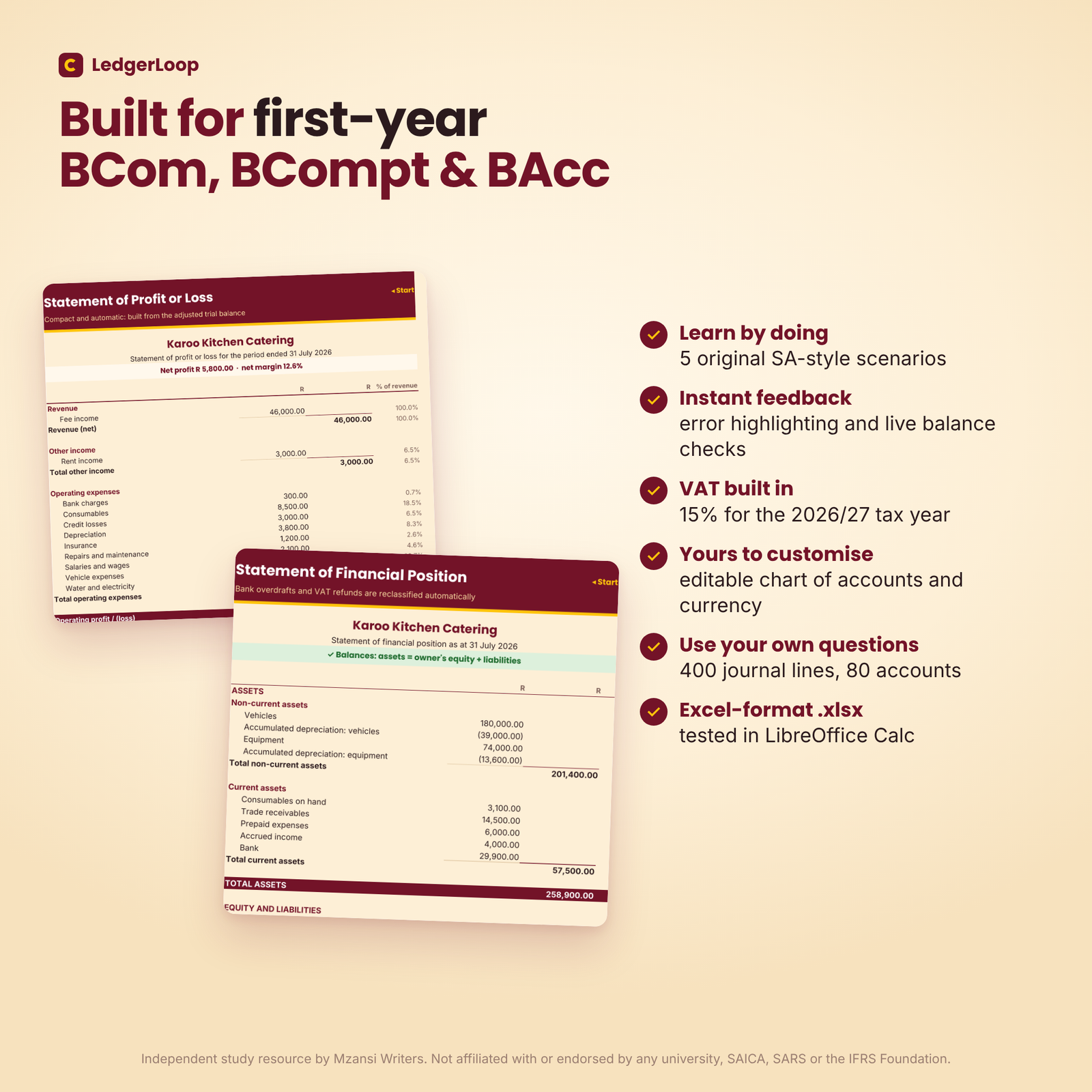
- South African context: rand by default, SA English and VAT at the 15% standard rate for the 2026/27 tax year.
Features
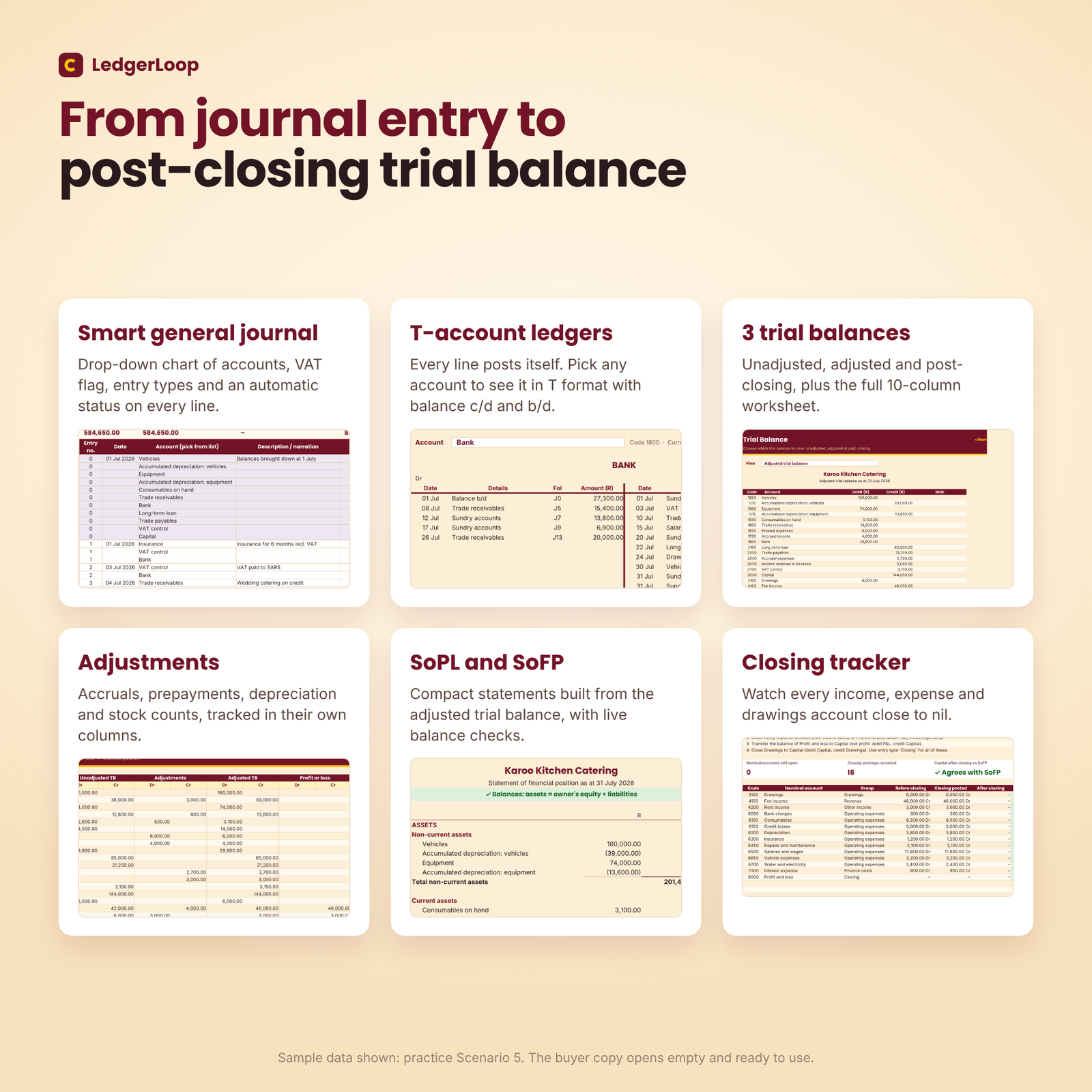
General journal with smart checks
A drop-down chart of accounts, a date, a debit or credit amount, an optional VAT flag and an entry type (opening, normal, adjusting or closing) on every line. Totals, the difference and the error count sit at the top. Adjusting entries are shaded yellow and closing entries pink. Capacity: 400 lines.
VAT handled two ways
Record the VAT control line yourself, or type the VAT-inclusive amount and choose “Incl. VAT” to have the 15/115 split posted for you. Both give identical balances. A VAT refund or a bank overdraft moves to the correct side of the statement of financial position automatically.
T-accounts, worksheet and three trial balances
Pick any two accounts to see them in classic T format, with contra accounts, folio references and balances carried down. The 10-column worksheet and a trial balance viewer (unadjusted, adjusted or post-closing) flag unusual balances.
Statements and closing
A compact statement of profit or loss (with % of revenue) and a statement of financial position for a sole proprietor build themselves from the adjusted trial balance. The Closing sheet tracks every income, expense and drawings account until it reaches nil.
Dashboard
KPI tiles, an eight-step progress tracker, live balance checks, a practice-scenario tracker and two native charts (profit snapshot and the accounting equation).
What is included
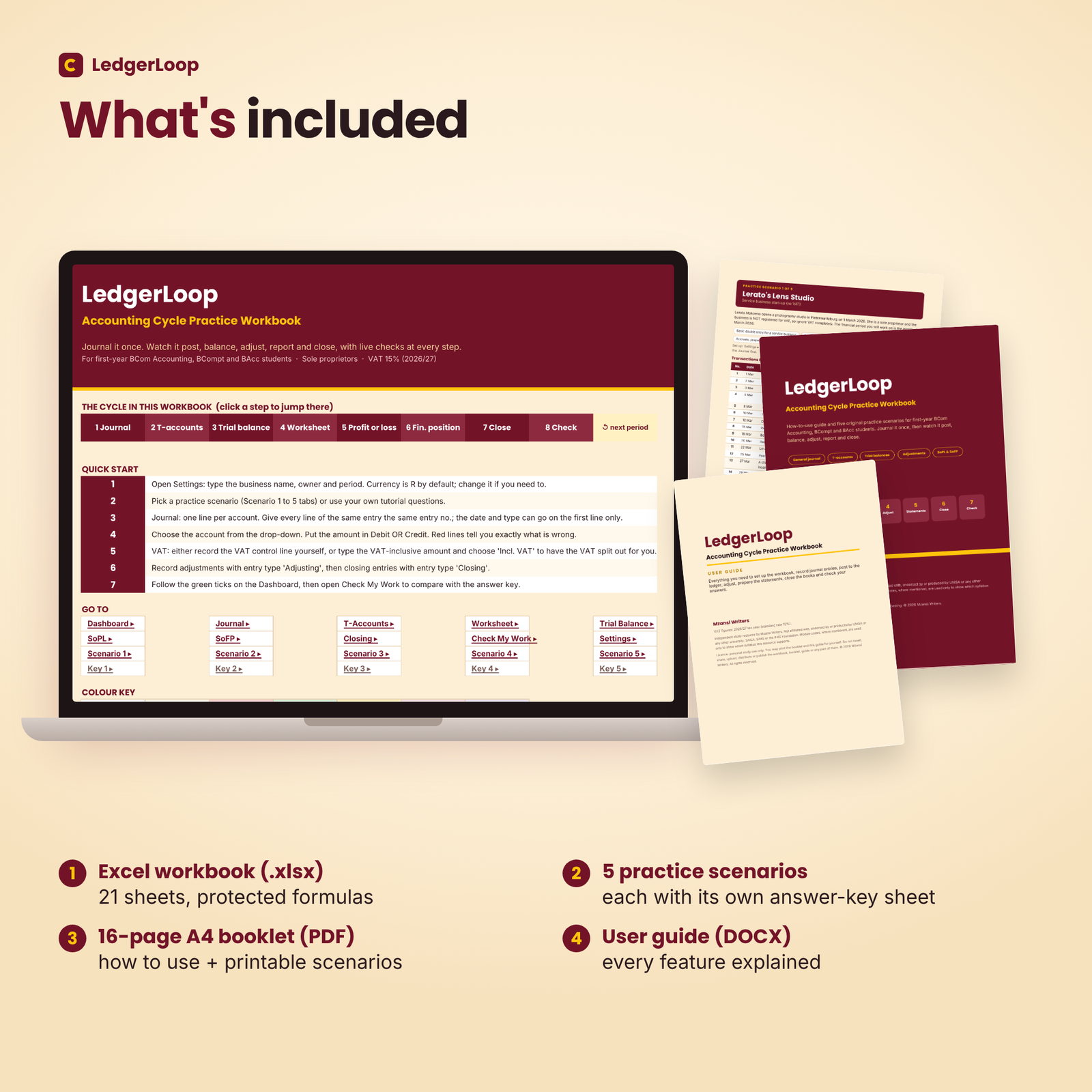
- LedgerLoop workbook (.xlsx): 21 sheets, including Start, Dashboard, Journal, T-Accounts, Worksheet, Trial Balance, SoPL, SoFP, Closing, Check My Work and Settings, plus 5 scenario sheets and 5 answer-key sheets. The buyer copy opens empty and ready to use.
- How to use + practice scenarios booklet (PDF, A4, 16 pages): a step-by-step guide, a VAT guide, an adjustments cheat sheet, the five scenarios ready to print and check figures, with a clickable contents page.
- User guide (DOCX): every feature explained, with troubleshooting and FAQs.
The five practice scenarios
- Lerato’s Lens Studio: service business start-up without VAT, with accruals, prepayments, income received in advance and depreciation.
- Bokamoso Garden Care: service business registered for VAT, with zero-rated fuel and a VAT refund position.
- Kasi Kicks Sneaker Store: perpetual inventory, returns, settlement discount, goods taken by the owner and a stock count deficit.
- Umoya Stationers: trading business with VAT, opening balances, VAT paid to SARS and a net loss.
- Karoo Kitchen Catering: a full exam-style month with VAT, a loan, credit losses and seven adjustments.
Every answer key was calculated and checked in Python (each entry balances, all trial balances balance, assets equal equity plus liabilities, and every nominal account is nil after closing), and each scenario was entered into the workbook to confirm a 100% match.
How it works
- Type the business name, owner and period on the Settings sheet.
- Open a scenario sheet (or use your own tutorial question) and record the transactions in the Journal.
- Fix any red lines until the journal and the unadjusted trial balance balance.
- Record the adjustments, review the statements, then record the closing entries.
- Open Check My Work, choose the scenario and fix any ✗. Set “Show key amounts?” to No if you want to find mistakes without seeing the answers.
File formats and software requirements
Excel-format .xlsx; tested in LibreOffice Calc; built with standard functions for Microsoft Excel and Google Sheets. No macros and no add-ins. The booklet is a PDF and the user guide is a Word (.docx) file.
Customisation
Change the currency symbol in one setting cell (R by default). Edit or add accounts in the chart of accounts (up to 80), change the VAT rate if a question uses a different one, and clear the journal to practise any textbook or tutorial question. Formulas are protected without a password so you cannot break them by accident.
Digital download
This is a digital product. You will receive download links for the three files straight after payment. Nothing is posted.
Use cases
- Working through tutorial questions and checking that your trial balance and statements balance before class.
- Practising VAT entries and month-end adjustments before a test.
FAQ
Does it work in Google Sheets?
It is built with standard functions for Microsoft Excel and Google Sheets and was tested in LibreOffice Calc. Upload the .xlsx to Google Drive and open it with Google Sheets.
Is this for UNISA or a specific module?
It supports first-year financial accounting topics in general (the accounting cycle for a sole proprietor, VAT and adjustments). It is not linked to any one university.
Which VAT rate does it use?
15%, the standard rate for the 2026/27 tax year. You can change the rate on the Settings sheet.
Can I use my own textbook questions?
Yes. Clear the journal, update the Settings and record any sole-proprietor question.
Are the answer keys reliable?
Yes. Every key was computed and cross-checked in Python and confirmed in the workbook itself.
Can I share it with friends?
No. The licence covers one person’s personal study use.
Licence and disclaimer
Personal study use only. Do not resell, share, upload or distribute the files. Independent study resource by Mzansi Writers. Not affiliated with, endorsed by or produced by UNISA or any other university, SAICA, SARS or the IFRS Foundation. Module codes, where mentioned, are used only to show which syllabus this resource supports. The scenario businesses and people are fictional.


Reviews
There are no reviews yet.