



Description
BCom Accounting Degree Planner & Tracker for South African Students
Ledger to Laurels is a BCom Accounting degree planner and tracker that keeps your whole qualification organised in one place. Instead of juggling portal pages, notebooks and phone reminders, you type your modules, deadlines and marks once and the workbook does the rest: it flags overdue assessments, tracks exam admission, counts down to every exam, works out the exam mark you need and shows how many credits you still need to graduate.
It comes with a 13-page printable A4 planner insert pack and a step-by-step user guide, so you can plan on screen and on paper.
Who it is for
- BCom Accounting, BCompt, BAcc and BCom Accounting Sciences students at any South African university or college
- Distance learners who manage semester modules, year modules, compulsory assessments and exam admission on their own
- Working students who need to plan study time and money carefully
- Anyone repeating a module or planning which modules to take next year
Main benefits
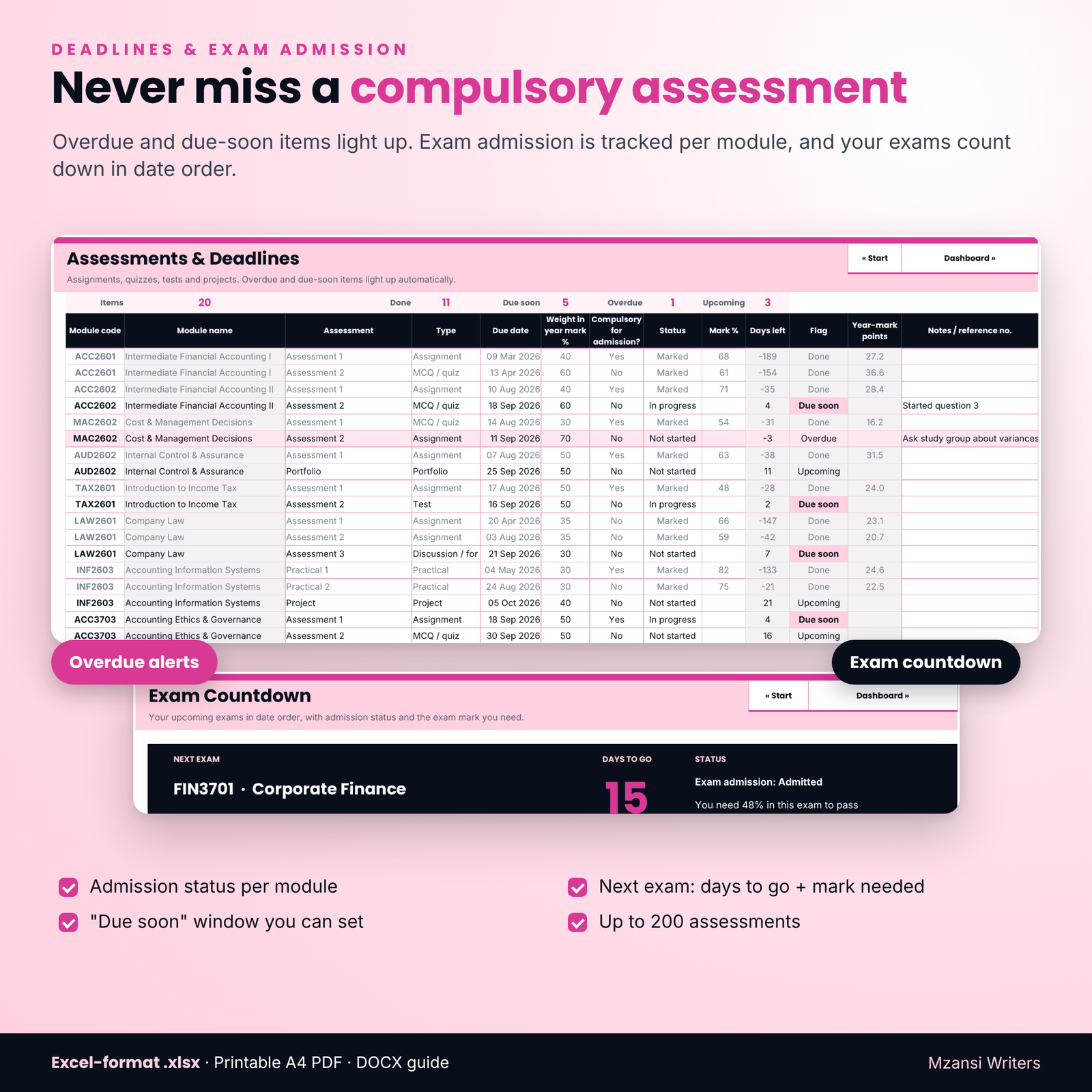
- Never miss a deadline. Overdue items turn pink and “due soon” items are highlighted automatically.
- Know what you need in the exam. Your year mark updates as marks come in, and the planner shows the exam mark needed to pass and to get a distinction, never below the subminimum.
- Track exam admission. Choose each module’s rule (compulsory assessment, minimum year mark, both or none) and see Admitted, Pending or At risk.
- See your road to graduation. A credits-to-graduate counter (360 credits by default, fully editable) shows your progress by year level and estimates your final year of study.
- Stay on budget. Track fees owed and paid, set a monthly budget and log money in and out in your own currency.
Features of the degree planner spreadsheet
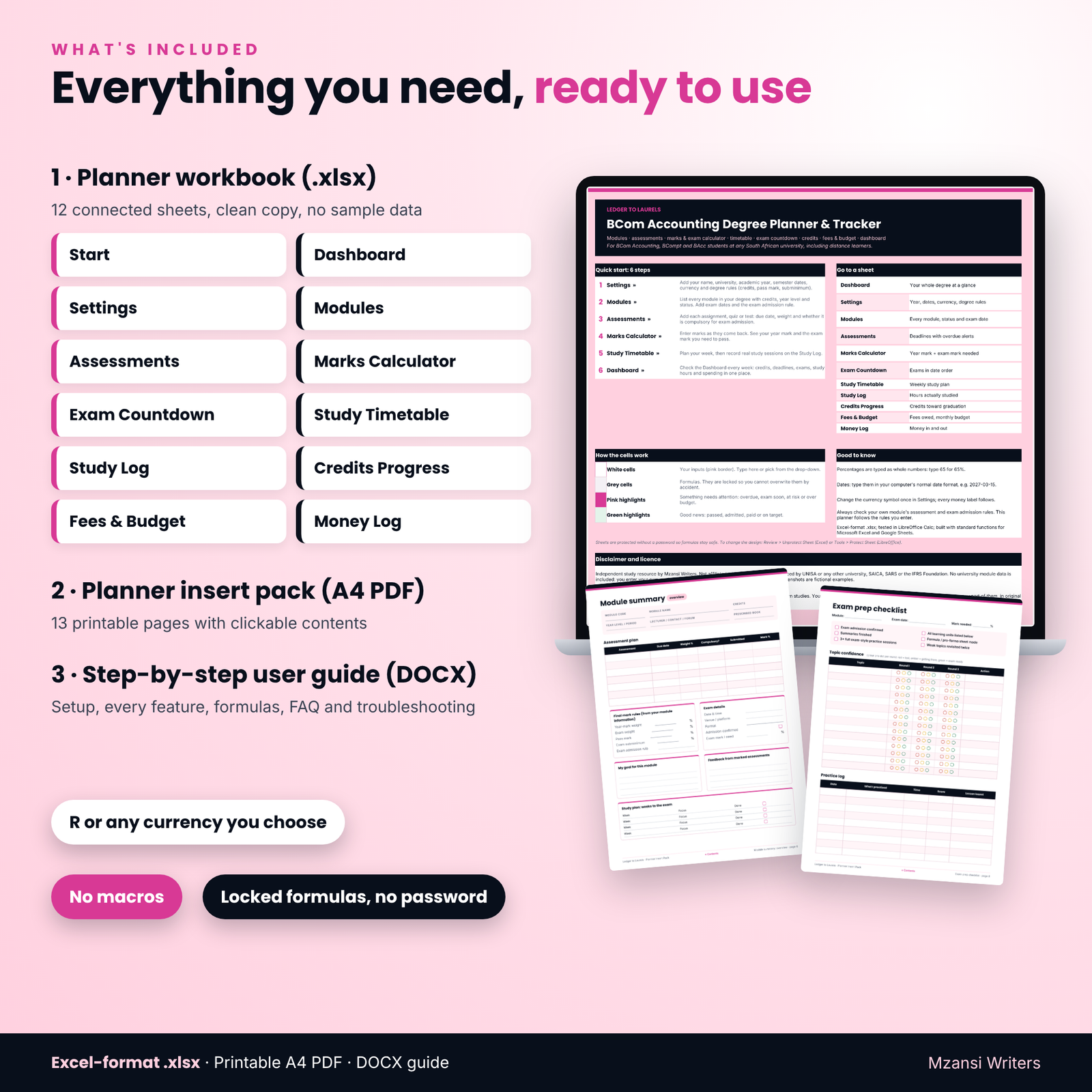
12 connected sheets
- Start: quick-start steps, clickable navigation, colour legend, disclaimer and licence
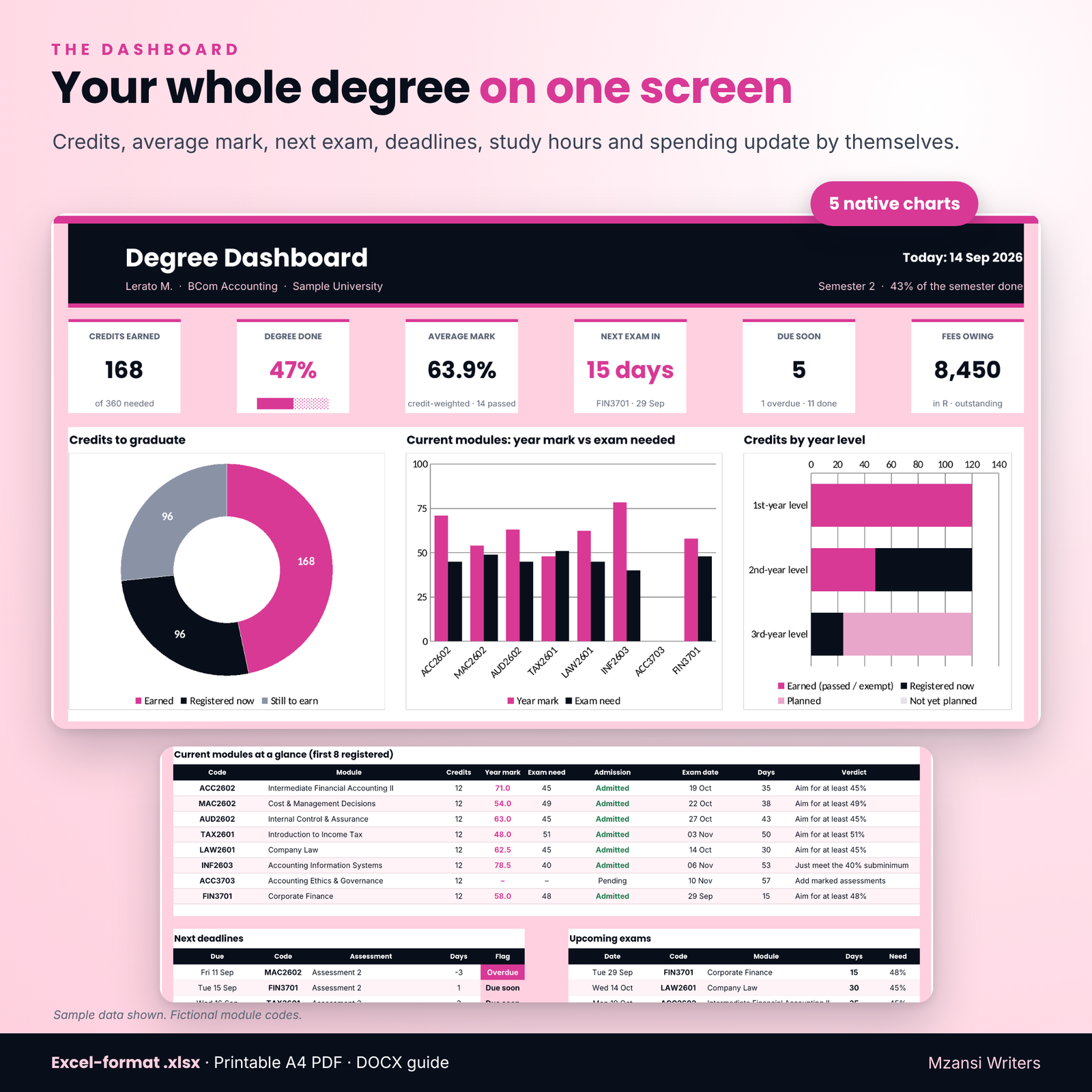
- Dashboard: six key-figure tiles, five native charts, current modules at a glance, next deadlines and upcoming exams
- Settings: university, academic year, semester dates, pass mark, subminimum, distinction mark, credits rules and currency symbol
- Modules: up to 40 modules with code, credits, year level, semester or year module, status drop-down, exam date and admission rule
- Assessments: up to 200 assignments, quizzes, tests and projects with due dates, weights, compulsory flag, status and marks
- Marks Calculator: a quick “what do I need in the exam?” calculator plus a per-module tracker with “what if” exam marks and projected results
- Exam Countdown: next exam banner and up to 20 upcoming exams in date order
- Study Timetable: a weekly grid from 06:00 with planned hours per module against your goal
- Study Log: record real study sessions; the last 8 weeks are charted against your goal
- Credits Progress: credits by year level and by academic year, pass rate and estimated final year
- Fees & Budget: fees schedule with balances and due-date alerts, monthly budget and month-by-month chart
- Money Log: every amount in and out by category
Printable A4 planner insert pack (13 pages)
Degree roadmap, semester at a glance, weekly planner, module summary pages (overview and topic map), exam prep checklist, exam-week checklist, a “What do I need in the exam?” worksheet with four worked examples, assessment tracker, monthly budget with neutral “Amount” fields, and a dot-grid notes page. The contents page is clickable.
What is included
- Ledger-to-Laurels-Degree-Planner.xlsx (clean copy, no sample data)
- Ledger-to-Laurels-Planner-Insert-Pack-A4.pdf (13 printable pages)
- Ledger-to-Laurels-User-Guide.docx (setup, every feature, formulas, tips, troubleshooting and FAQ)
The listing images show the planner filled with fictional sample data so you can see how it looks in use. Your download is a clean copy ready for your own modules.
How it works
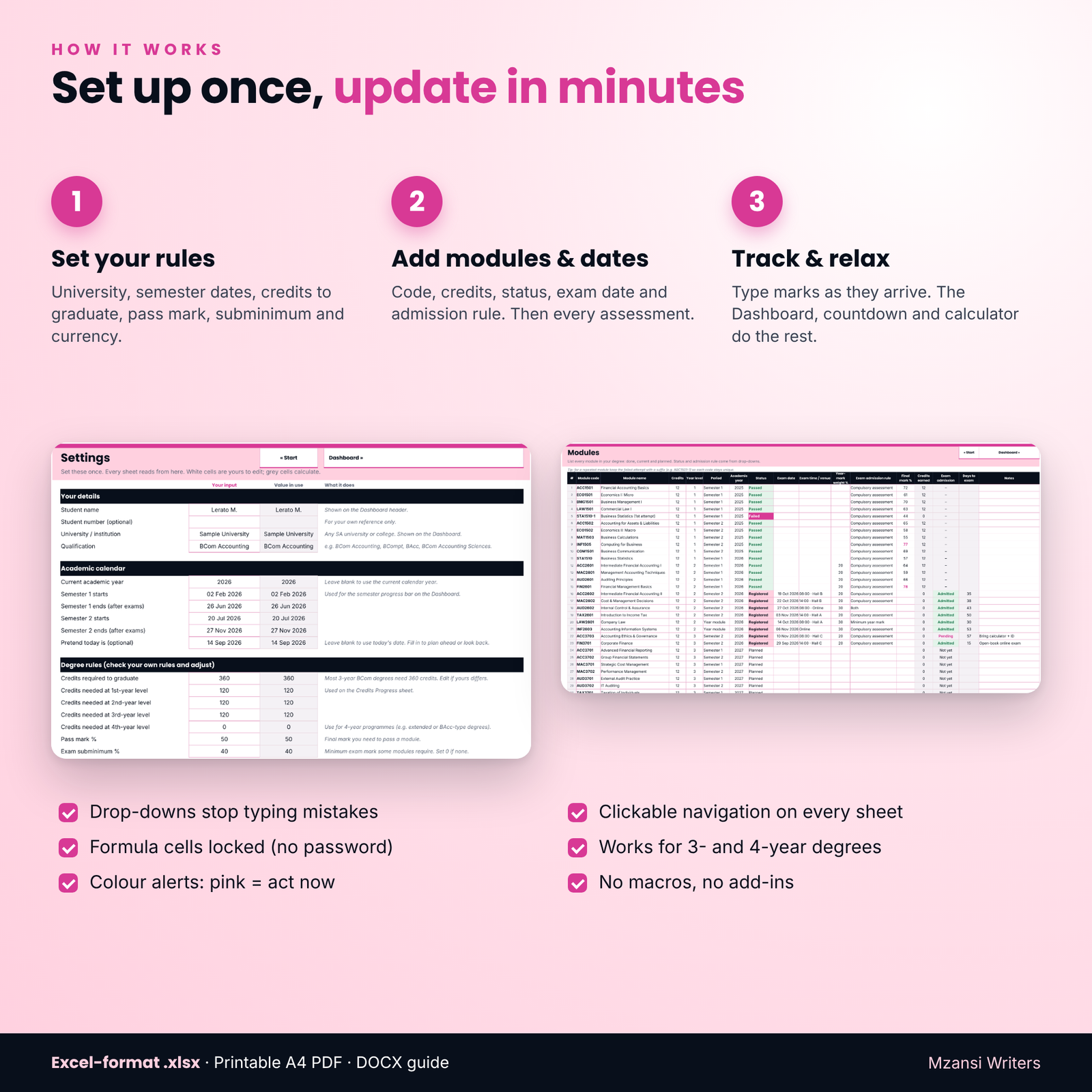
- Set your rules in Settings: semester dates, credits to graduate, pass mark, subminimum and currency.
- Add your modules with credits, status and exam dates, then add each assessment with its due date and weight.
- Update weekly. Mark items as submitted, type marks as they arrive and log your study hours. The Dashboard, countdown and calculators update themselves.
File formats and software requirements
- Excel-format .xlsx; tested in LibreOffice Calc; built with standard functions for Microsoft Excel and Google Sheets (Excel 2016 or later recommended). No macros or add-ins.
- Printable PDF (A4). Opens in any PDF reader.
- User guide in Word format (.docx), which also opens in Google Docs and LibreOffice Writer.
Customisation
Change the currency symbol once and every money label follows (R by default). Edit credits to graduate, credits per year level, pass mark, subminimum, distinction mark and the default year-mark weight, and override the weight per module. Rename budget categories, edit timetable time labels and set the timetable slot length. Formula cells are locked without a password, so they are safe from accidental changes but easy to unlock if you want to adapt the design.
Digital download
This is a digital product. No physical item will be shipped. Your files are available to download straight after payment. Print the insert pack as often as you need for your own studies.
Use cases
- Planning a new semester: list modules, assessment dates and exam dates on day one
- Checking whether a missed compulsory assessment puts exam admission at risk
- Working out the exam mark you need the week before an exam
- Planning which modules to register for next year and when you could graduate
- Keeping track of module fees, payment plans, textbooks, data and transport costs
FAQ
Is this BCom Accounting planner only for UNISA students?
No. It works for any South African university. Features such as year modules, compulsory assessments and exam admission tracking are especially useful for distance learners.
Are my university’s modules already filled in?
No. You add your own modules, dates and rules, so it fits any university and any year. No university module data is included.
Does it work in Google Sheets?
It is an Excel-format .xlsx built with standard functions that Google Sheets supports. Upload it to Google Drive and open it with Google Sheets. It was tested in LibreOffice Calc.
Can it calculate the exam mark I need to pass?
Yes. It uses your year mark, the year-mark weight, the pass mark and the exam subminimum you set, and rounds up to a whole percent.
What if my degree is not 360 credits?
Change the credits required and the credits per year level in Settings. It also supports 4-year programmes.
Can I use it on my phone?
You can view and update it in the Excel or Google Sheets apps, but a laptop or tablet is more comfortable for the larger sheets.
Can I share it with my study group?
No. The licence is for personal use only; each student needs their own copy.
Disclaimer and licence
Independent study resource by Mzansi Writers. Not affiliated with, endorsed by or produced by UNISA or any other university, SAICA, SARS or the IFRS Foundation. Module codes are used only to show which syllabus a resource supports; module codes in the images are fictional examples. Always confirm deadlines, exam admission and results with your university.
Licence: personal use only. No resale, sharing, distribution or uploading of the files or any part of them.


Reviews
There are no reviews yet.