Description
South African VAT calculator and practice workbook for 2026/27
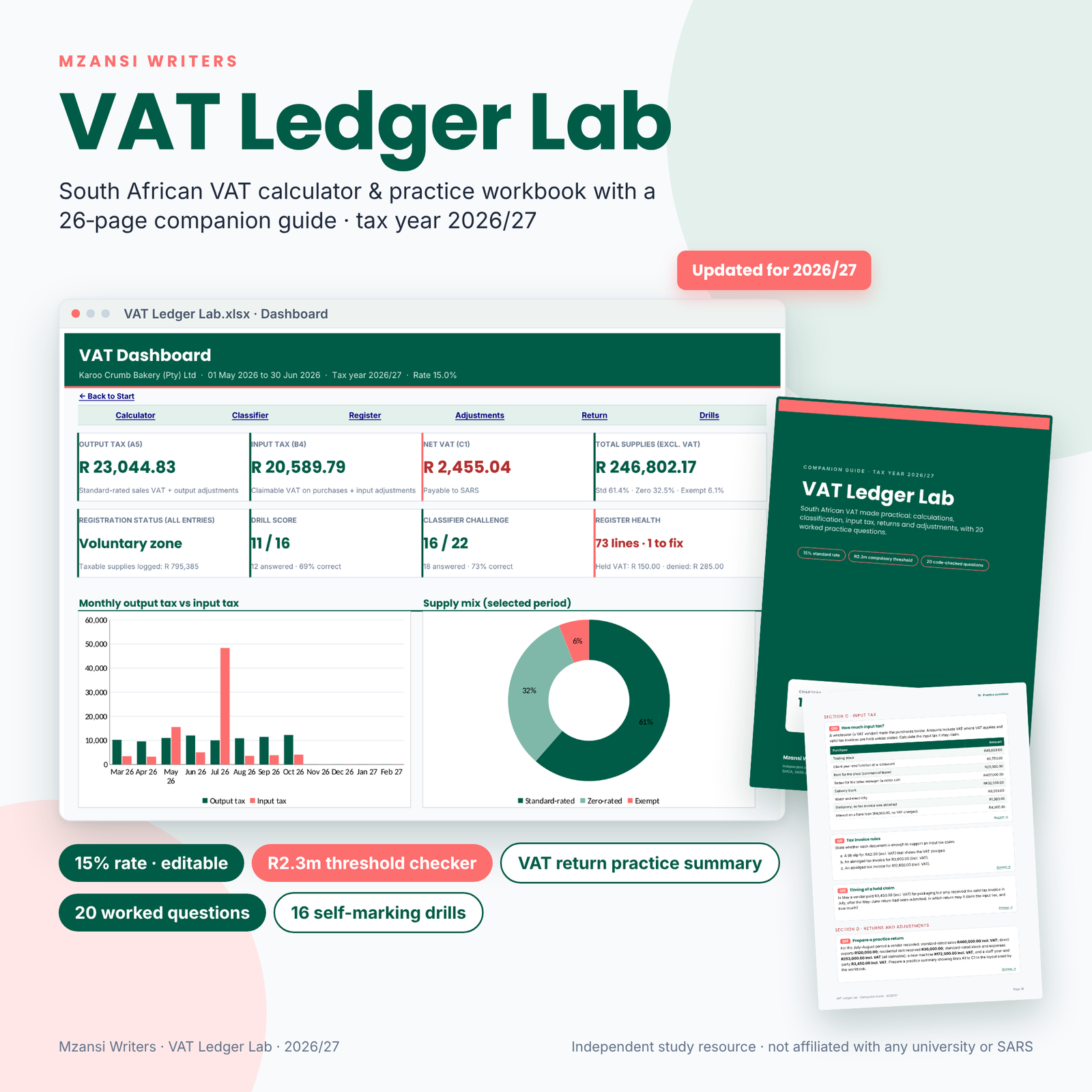
VAT Ledger Lab is a South African VAT calculator and practice workbook built for university students who need to master value-added tax for taxation modules and first-year accounting. It combines an Excel-format workbook that does the calculations with a companion guide that explains the rules in plain language and gives you 20 worked practice questions. The figures are set up for the 2026/27 tax year: a standard rate of 15%, a compulsory registration threshold of R2.3 million and a voluntary minimum of R120,000, all checked on sars.gov.za in November 2026.
Who it is for
- BCom Accounting, BCompt and BAcc students studying VAT in taxation modules, for example UNISA TAX3701 and TAX3761 (which replaced TAX3702), and similar modules at other universities.
- First-year accounting students who record VAT in journals and the VAT control account.
- Tutors and study group leaders who want a clear return layout and ready-made drills to teach from (each user needs their own licence).
What the VAT workbook does
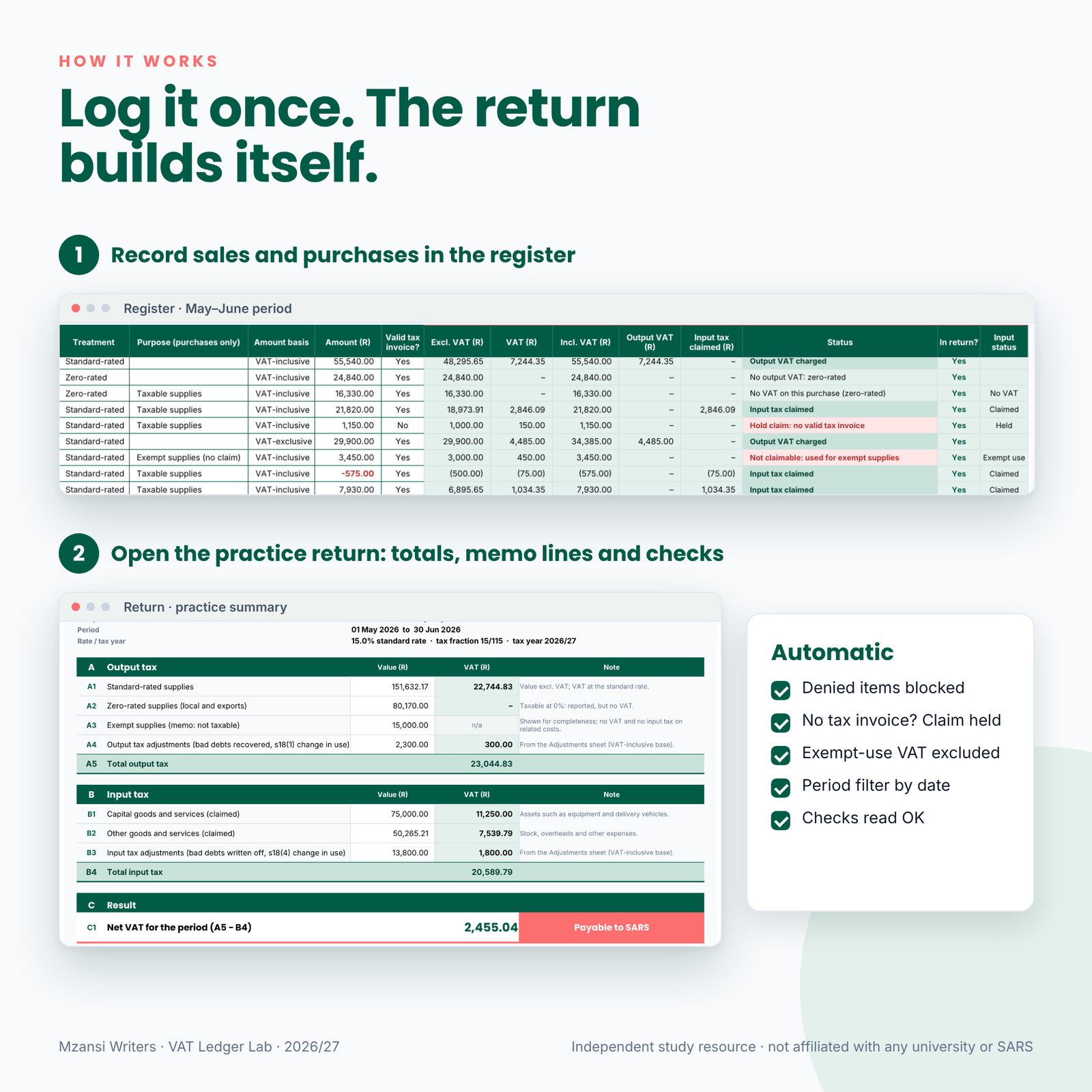
Instead of memorising rules in isolation, you record transactions once and watch how each one affects output tax, input tax and the final VAT result. Dropdowns keep entries consistent, protected formulas stop accidental overwrites, and coral flags show exactly what needs attention.
Main features
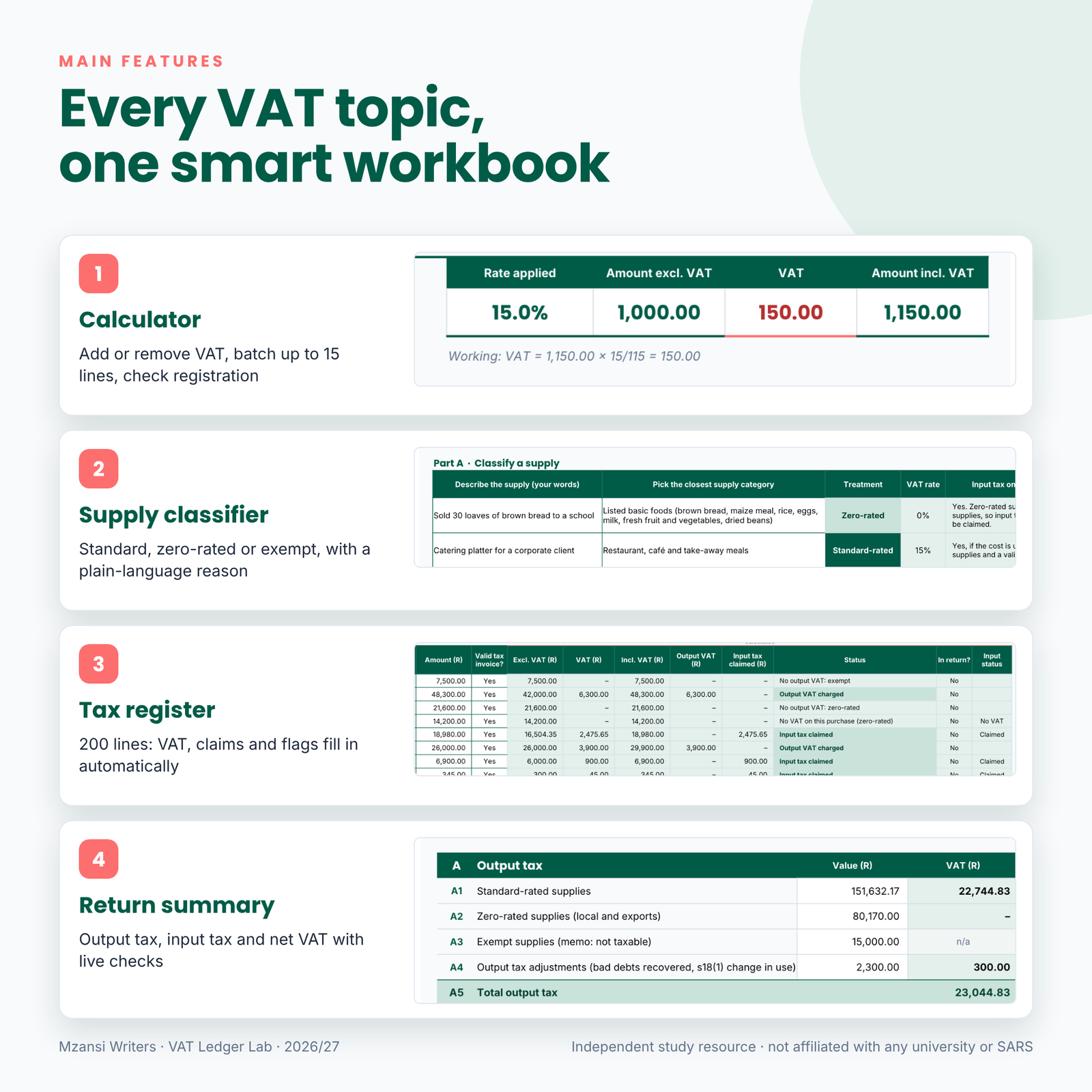
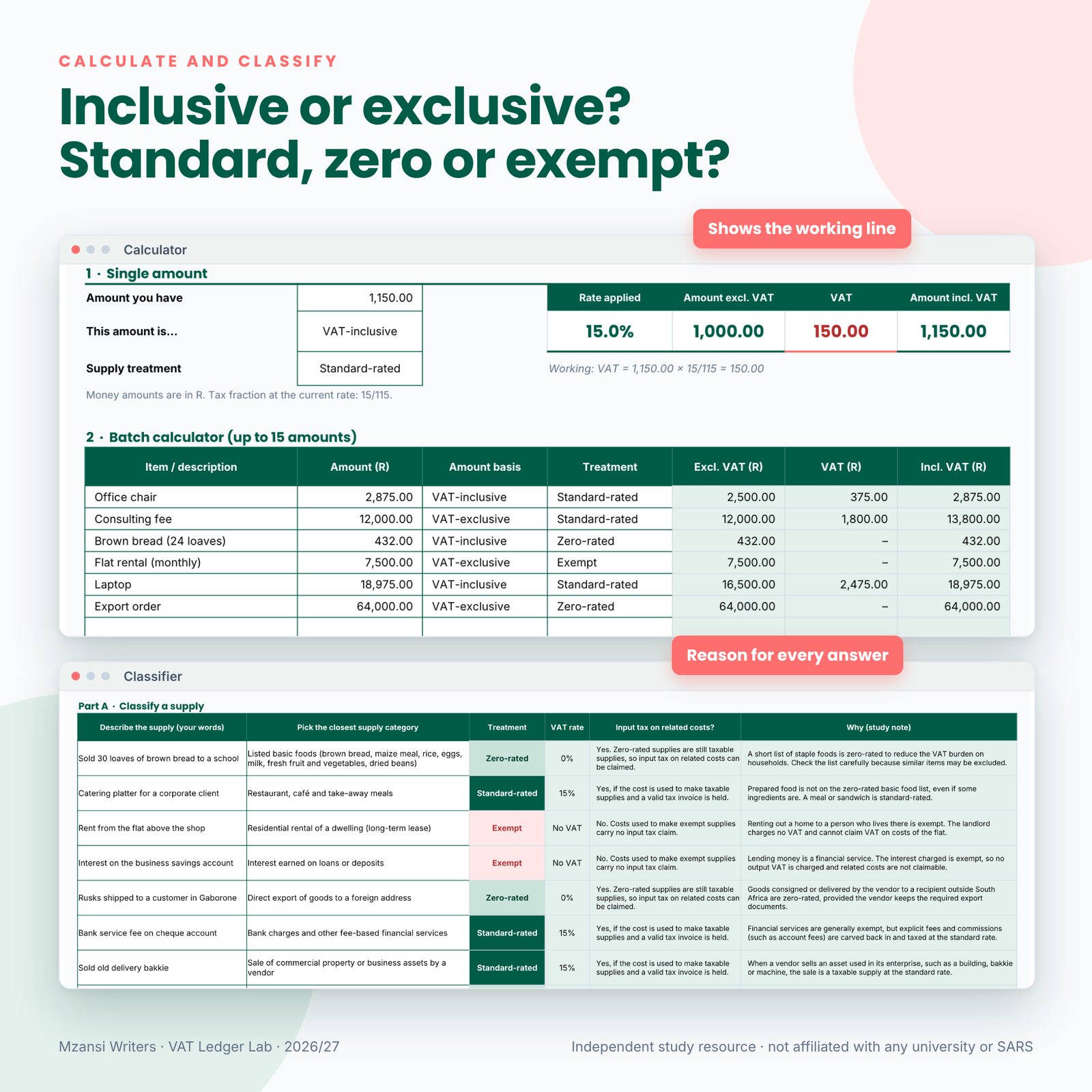
- VAT calculator: add or remove VAT in one step with a working line (for example “VAT = 1,150.00 × 15/115 = 150.00”), a 15-line batch calculator and a registration check against the R2.3 million and R120,000 thresholds.
- Supply classifier: choose from 28 supply categories to see whether a supply is standard-rated, zero-rated or exempt, the VAT rate, whether input tax on related costs can be claimed and a short reason in plain language.
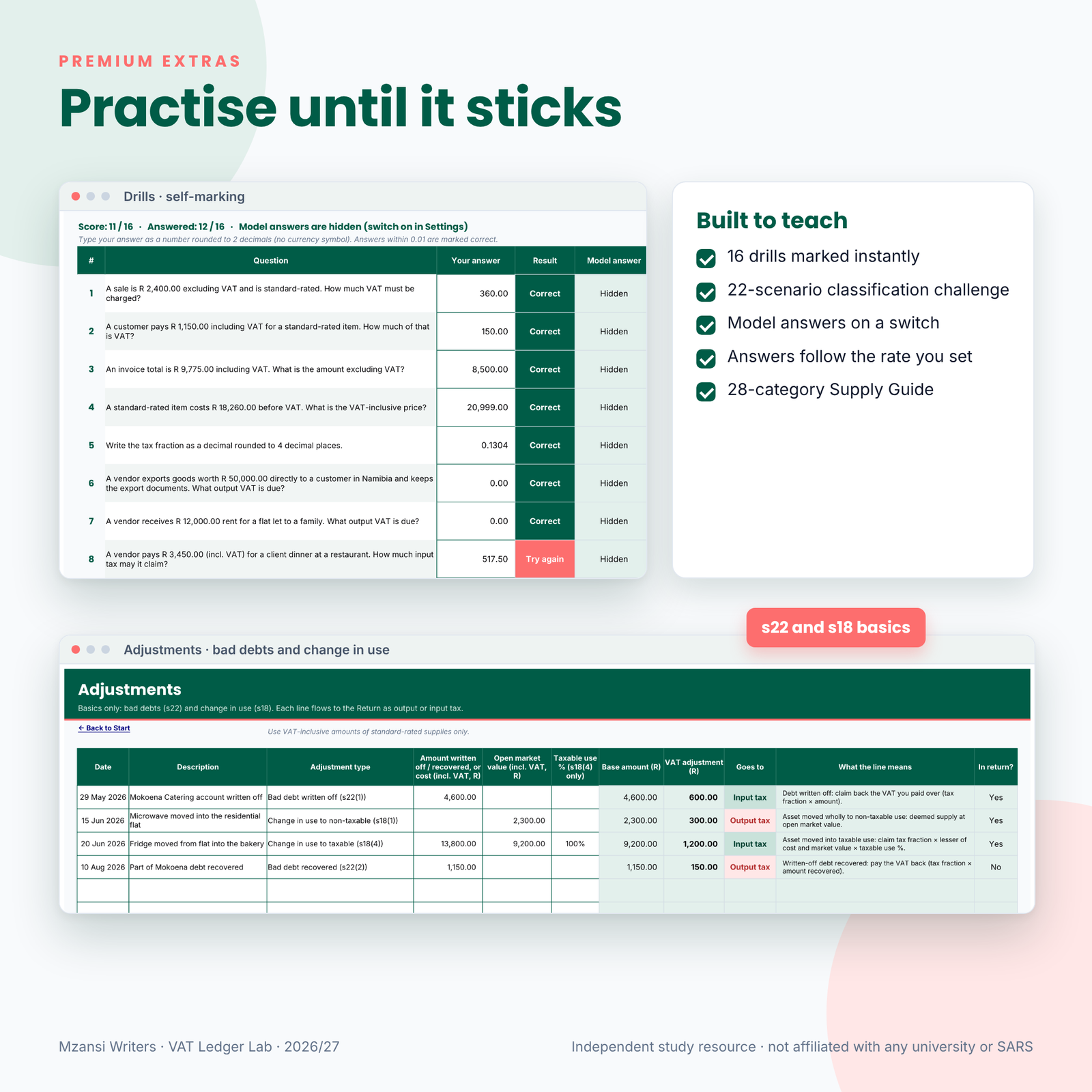
- Classification challenge: 22 original scenarios that mark themselves, with model answers you can switch on when you are ready.
- Input and output tax register: 200 lines that calculate the exclusive amount, VAT, inclusive amount, output VAT and claimable input tax. Denied items (entertainment, motor cars, club fees), costs used for exempt supplies and purchases without a valid tax invoice are blocked and flagged automatically.
- Adjustments (basics): bad debts written off and recovered (s22) and change in use (s18(1) and s18(4)), with the base, the VAT and the side of the return worked out for you.
- VAT return practice summary: an original layout (not a replica of the SARS form) with output tax, input tax, net VAT payable or refundable, memo lines for VAT not claimed and three reconciliation checks.
- 16 self-marking drills: answers follow the rate on the Settings sheet, so you can practise with any rate your lecturer sets.
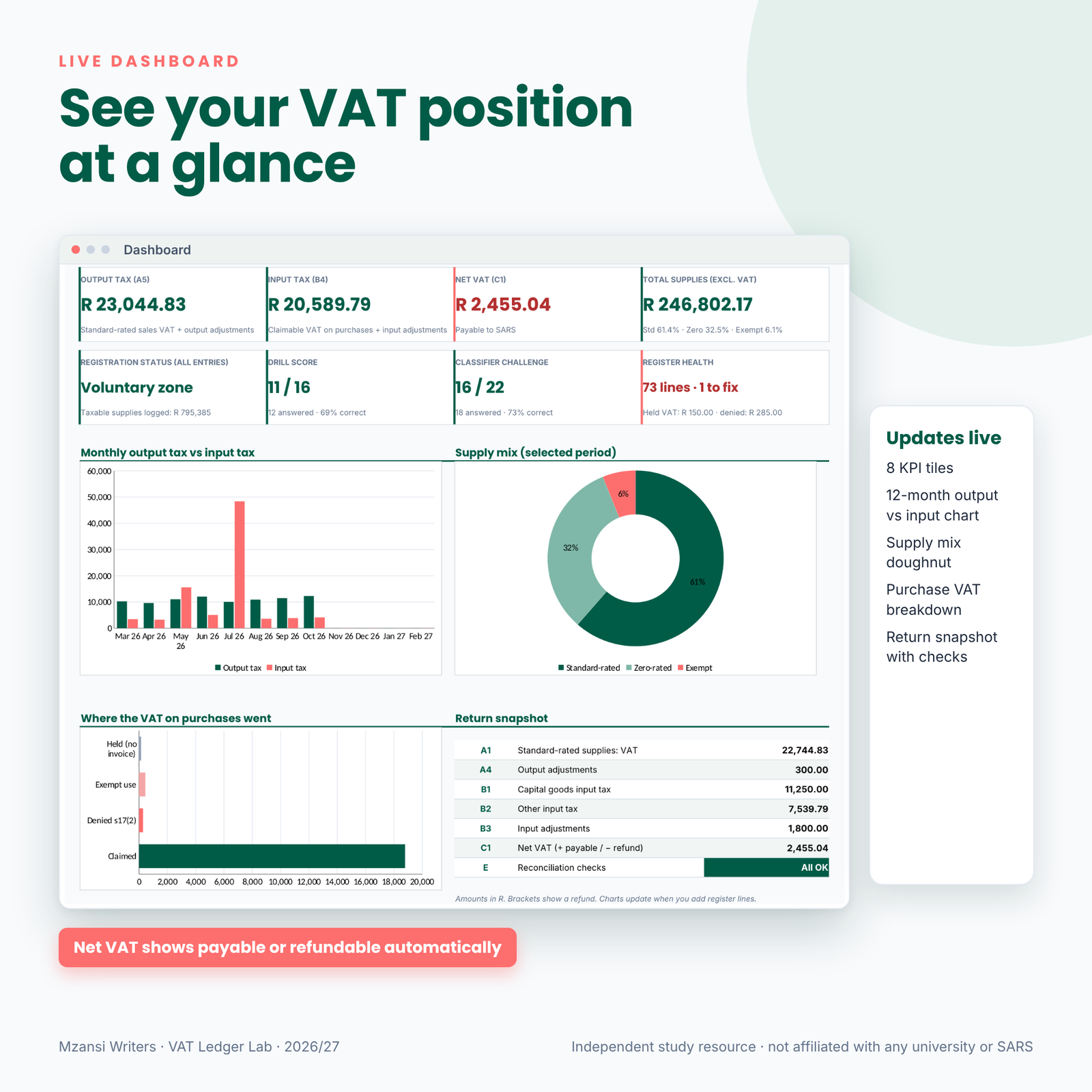
- Dashboard: eight KPI tiles, a 12-month output vs input tax chart, a supply-mix doughnut, a purchase-VAT breakdown, practice scores and a return snapshot.
- Settings: one cell each for the currency symbol (R by default), VAT rate, thresholds, return period and the model-answer switch.
What is included
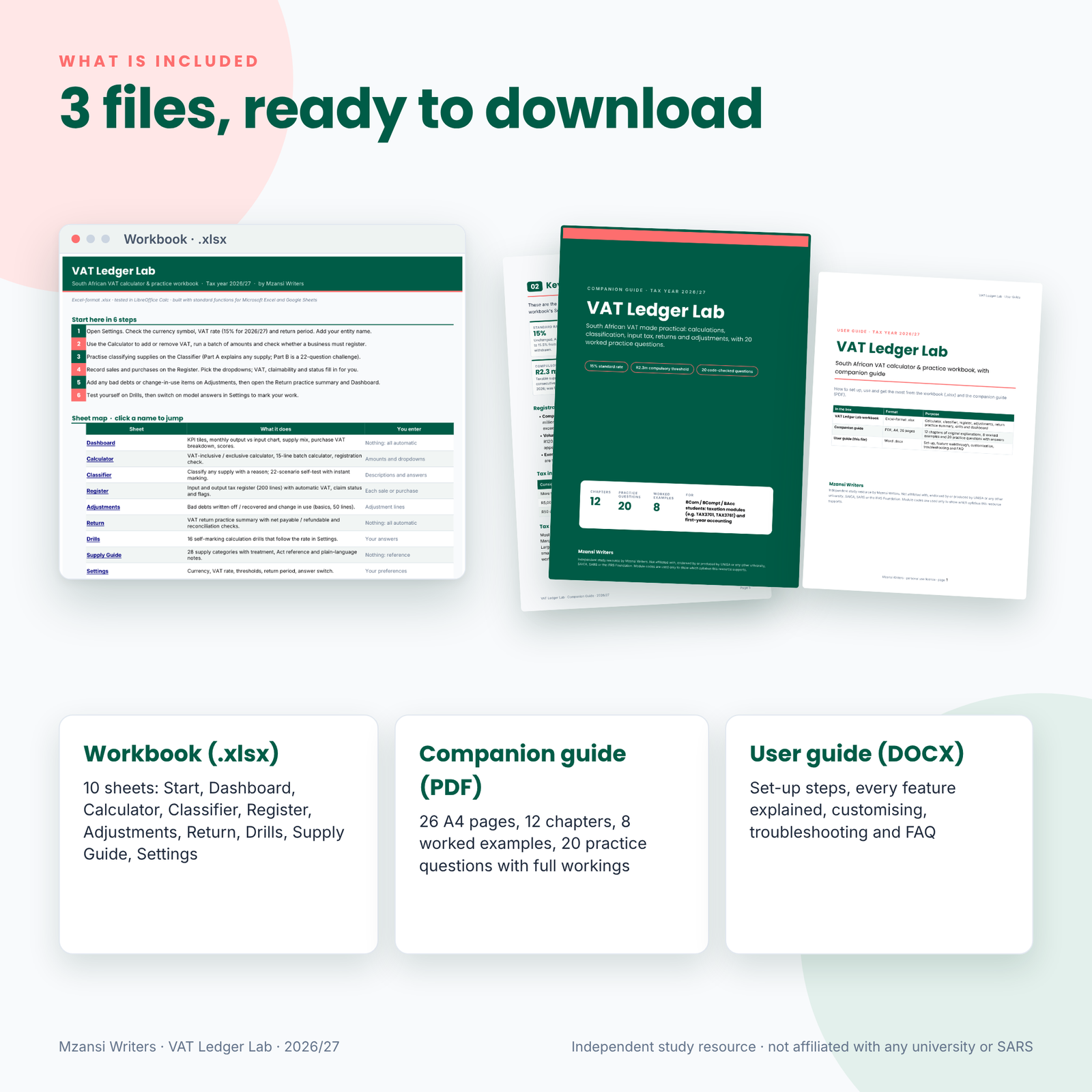
- VAT Ledger Lab workbook (.xlsx): 10 sheets: Start, Dashboard, Calculator, Classifier, Register, Adjustments, Return, Drills, Supply Guide and Settings. Delivered clean, ready for your own work.
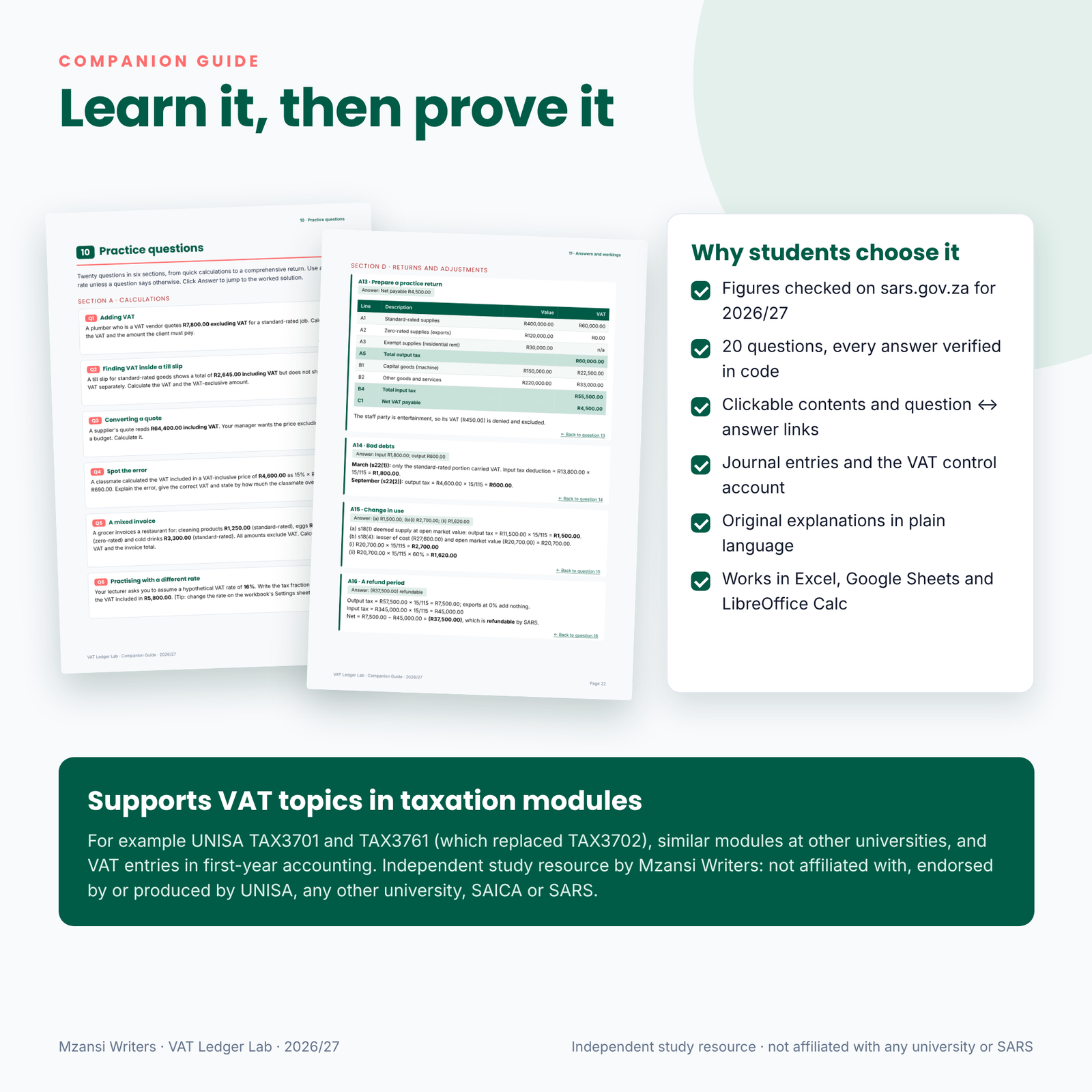
- Companion guide (PDF, A4, 26 pages): 12 chapters covering how VAT works, key 2026/27 figures, calculating VAT, classifying supplies, input tax, building a return, adjustments, VAT journals and the VAT control account, a workbook map, 20 practice questions, full answers and an exam checklist with glossary. Clickable contents and question-to-answer links.
- User guide (DOCX): set-up steps, how to use every feature, customisation, tips, troubleshooting and FAQ.
How it works
- Open Settings and check the rate, currency and return period.
- Use the Calculator and Classifier to practise the basics.
- Enter a scenario in the Register and Adjustments sheets.
- Open the Return practice summary and the Dashboard to see the result and the checks.
- Test yourself with the Drills and the companion guide questions, then compare with the worked answers.
Why students choose VAT Ledger Lab
Most VAT resources are either a basic online calculator or a page of notes. This toolkit connects the two: the guide teaches each rule, the workbook lets you apply it, and the return summary shows how everything fits together. Every worked example and every answer in the guide was calculated and checked in code before publication, and all explanations and questions are original.
Real situations where you will use it
- Checking your answer to a tutorial question on input tax or a full VAT return.
- Revising the difference between zero-rated and exempt supplies before a test.
- Practising bad debt and change-in-use adjustments for an assignment.
- Working out VAT entries for journals and the VAT control account in first-year accounting.
- Quickly adding or removing VAT from quotes and invoices while you study.
File formats and software requirements
Excel-format .xlsx; tested in LibreOffice Calc; built with standard functions for Microsoft Excel and Google Sheets. No macros are used. The guide is a PDF that opens on any phone, tablet or computer, and the user guide is a Word .docx file. A computer is recommended for the workbook.
Customisation
Change the currency symbol, VAT rate, thresholds, return period and dashboard start month on the Settings sheet. Sheets are protected without a password, so you can unprotect them if you want to adapt formulas. Column widths can be adjusted while protection is on.
Digital download
This is a digital product. After payment you can download all three files immediately. No physical item will be shipped.
Frequently asked questions
Is the VAT rate in the workbook current?
Yes. It uses the 15% standard rate listed by SARS for 2026/27, and you can edit it on the Settings sheet if the rate changes.
Which VAT registration thresholds are used?
R2.3 million for compulsory registration and R120,000 for voluntary registration, which apply from 1 April 2026 according to SARS. Both are editable.
Does it work in Google Sheets?
The workbook uses standard functions available in Google Sheets and Excel and was tested in LibreOffice Calc. Charts may look slightly different in Google Sheets.
Is the return sheet the official SARS VAT201 form?
No. It is an original practice summary for study. Real returns are submitted on SARS eFiling.
Are the questions taken from past papers?
No. All questions, examples and explanations are original, and every answer was verified in code.
Does it cover apportionment?
No. Adjustments cover the basics only (bad debts and change in use). Apportionment for mixed supplies is outside the scope.
Can I share it with my study group?
No. The licence is for personal use only, so each student needs their own copy.
Licence and disclaimer
Personal use only. You may not resell, share, distribute or upload the files (or any part of them) to any website, cloud folder, group chat or note-sharing platform.
Independent study resource by Mzansi Writers. Not affiliated with, endorsed by or produced by UNISA or any other university, SAICA, SARS or the IFRS Foundation. Module codes are used only to show which syllabus this resource supports. This product is a study aid and not tax advice.


Reviews
There are no reviews yet.